
Lincoln Navigator: Wipers and Washers / Rear Window Washer Jet. Removal and Installation
Removal
NOTE: Removal steps in this procedure may contain installation details.
-
Remove the rear spoiler.
Refer to: Rear Spoiler (501-08 Exterior Trim and Ornamentation, Removal and Installation).
-
Remove the cover.
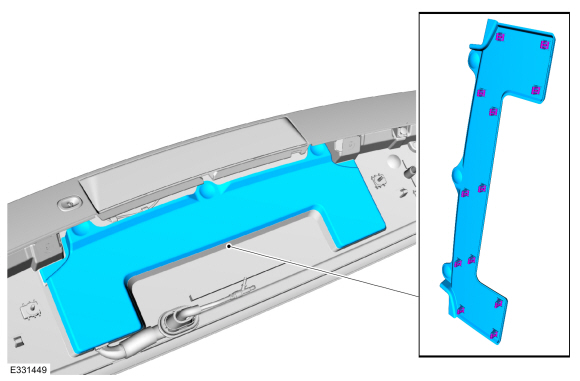 |
-
Disconnect the rear window washer jet fluid hose.
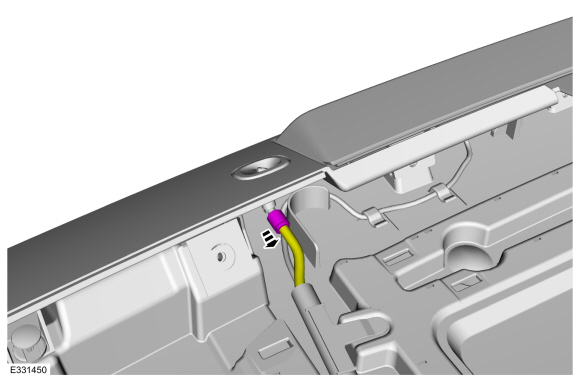 |
-
Depress the locking tabs and remove the rear window washer jet.
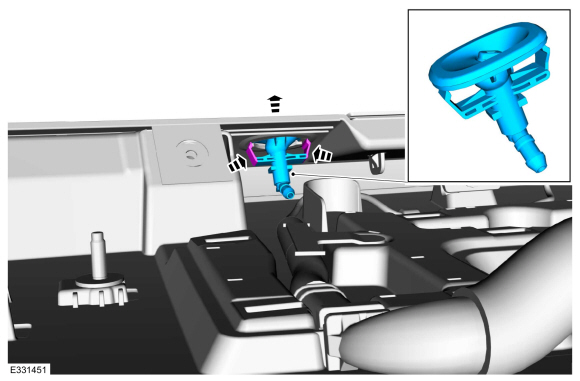 |
Installation
-
To reinstall, reverse the removal procedure.
 Rain Sensor. Removal and Installation
Removal
Remove the trim cover.
Detach the clips and lower the trim cover.
Disconnect the passenger airbag deactivation module electrical connector and remove the trim cover...
 Rear Window Wiper Motor. Removal and Installation
Special Tool(s) /
General Equipment
Interior Trim Remover
Removal
NOTE:
Removal steps in this procedure may contain installation details...
Other information:
Lincoln Navigator 2018-2026 Workshop Manual: Power Brake System - Overview. Description and Operation
Electric Brake Boost Overview The power assisted brake system utilizes an EBB . The EBB is an integrated function of the ABS / HCU assembly and is controlled by the ABS module. The ABS / HCU combines the functions of a conventional vacuum booster and ABS module...
Lincoln Navigator 2018-2026 Workshop Manual: Evaporative Emission Canister Vent Solenoid. Removal and Installation
Removal NOTE: Removal steps in this procedure may contain installation details. Remove the EVAP canister. Refer to: Evaporative Emission Canister (303-13 Evaporative Emissions - 3.5L EcoBoost (272kW/370PS), Removal and Installation)...
Categories
- Manuals Home
- 4th Gen Lincoln Navigator Service Manual (2018 - 2026)
- Body Control Module (BCM). Removal and Installation
- Vehicle Dynamics Control Module (VDM). Removal and Installation
- Liftgate Trim Panel. Removal and Installation
- Windshield Washer Pump. Removal and Installation
- All Terrain Control Module (ATCM). Removal and Installation
Wheel to Hub Runout Minimization. General Procedures
Check
NOTE: Wheel-to-hub optimization is important. Clearance between the wheel and hub can be used to offset or neutralize the Road Force® or run-out of the wheel and tire assembly. For every 0.001 inch of wheel-to-hub clearance, the Road Force® can be affected between 1 and 3 pounds depending on the tire stiffness.
NOTE: The example below illustrates how the clearance between the wheel and the hub can be used to offset the high spot of radial run-out or Road Force®. Following the procedure will make sure of the best optimization.
Position the wheel and tire assembly on the vehicle so that the high spot location of radial run-out or Road Force® is at the 6 o'clock position and