
Lincoln Navigator: Handles, Locks, Latches and Entry Systems / Front Door Lock Control Switch. Removal and Installation
Removal
NOTE: LH side shown, RH side similar.
-
Remove the front door trim panel.
Refer to: Front Door Trim Panel (501-05 Interior Trim and Ornamentation, Removal and Installation).
-
Remove the front door lock control switch.
-
Disconnect the front door lock control switch electrical connector.
-
Release the retaining clips.
-
Remove the front door lock control switch.
-
Disconnect the front door lock control switch electrical connector.
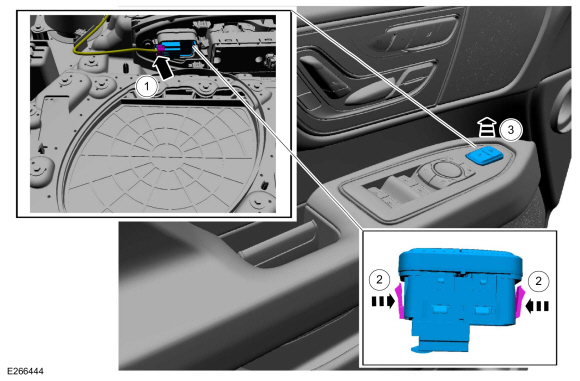 |
Installation
-
To install, reverse the removal procedure.
 Front Door Latch. Removal and Installation
Special Tool(s) /
General Equipment
Interior Trim Remover
Removal
NOTE:
LH side shown, RH side similar.
NOTE:
Removal steps in this procedure may contain installation details...
 Hood Latch. Removal and Installation
Removal
NOTE:
Removal steps in this procedure may contain installation details.
Remove the pin-type retainers and position the air cleaner panel aside
Release the clips and position the RH and LH cowl filler panels aside...
Other information:
Lincoln Navigator 2018-2026 Workshop Manual: Turbocharger Oil Supply Tube RH. Removal and Installation
Materials Name Specification Motorcraft® Metal Brake Parts CleanerPM-4-A, PM-4-B, APM-4-C - Removal NOTICE: The turbocharger compressor vanes can be damaged by even the smallest particles. When removing any turbocharger or engine air intake system component, ensure that no debris enters the system...
Lincoln Navigator 2018-2026 Workshop Manual: Differential Bearings. Removal and Installation
Special Tool(s) / General Equipment 100-002 (TOOL-4201-C) Holding Fixture with Dial Indicator Gauge 205-001 (TOOL-4000-E) Spreader, Differential Carrier 205-005 (T53T-4621-C) Installer, Drive Pinion Bearing Cone 205-010 (T57L-4221-A2) Installer, Differential Side Bearing 205-024 (T67P-4616-A) Installer, Drive Pinion Bearin..
Categories
- Manuals Home
- 4th Gen Lincoln Navigator Service Manual (2018 - 2026)
- Neutral Flat Tow Activation and Deactivation. General Procedures
- Windshield Washer Pump. Removal and Installation
- Vehicle Dynamics Control Module (VDM). Removal and Installation
- Head Up Display (HUD) Module Calibration. General Procedures
- Body Control Module (BCM). Removal and Installation
Rear Drive Axle and Differential. Diagnosis and Testing
Symptom Chart(s)
Diagnostics in this manual assume a certain skill level and knowledge of Ford-specific diagnostic practices.
REFER to: Diagnostic Methods (100-00 General Information, Description and Operation).
Symptom Chart - Differential
Symptom Chart - Differential
Condition Actions Axle overheating GO to Pinpoint Test A Broken gear teeth on the ring gear or pinion GO to Pi
