
Lincoln Navigator: Vehicle Dynamic Suspension / Vehicle Dynamics Control Module (VDM). Removal and Installation
Removal
NOTICE: Electronic modules are sensitive to static electrical charges. If exposed to these charges, damage may result.
NOTE: Removal steps in this procedure may contain installation details.
-
NOTE: The current PMI process must begin with the current VDM installed. If the current VDM does not respond to the diagnostic scan tool, the tool may prompt for As-Built Data as part of the repair.
Using a diagnostic scan tool, begin the PMI process for the VDM following the on-screen instructions.
-
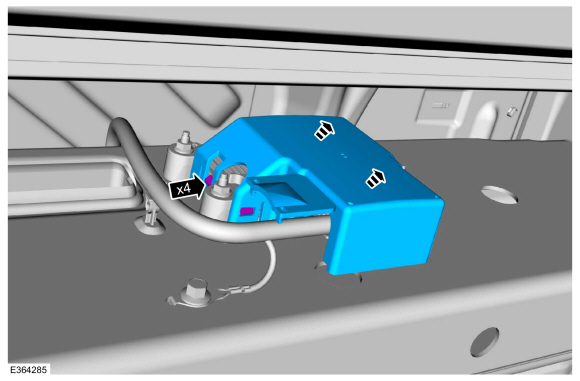
Release the clips and remove the VDM cover.
 |
-
-
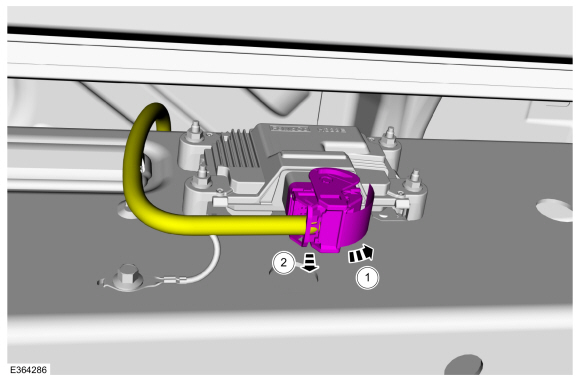
Unlatch the VDM electrical connector.
-
Disconnect the VDM electrical connector.
-
Unlatch the VDM electrical connector.
 |
-
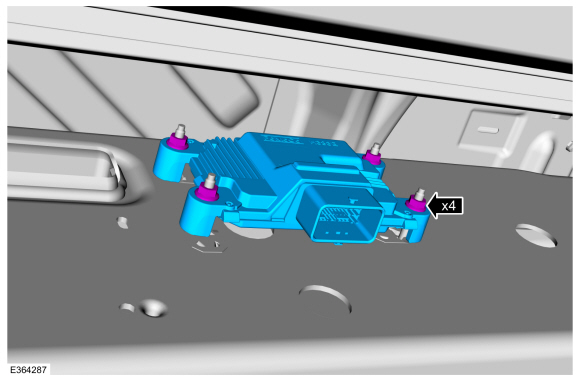
NOTE: The VDM is mounted to the LH outside frame rail.
Remove the retainers and the VDM .
Torque: 71 lb.in (8 Nm)
 |
Installation
-
To install, reverse the removal procedure.
-
Using a diagnostic scan tool, complete the PMI process for the VDM following the on-screen instructions.
-
Calibrate the VDM . Connect the scan tool and carry out the Ride Height Calibration routine. Follow the scan tool directions.
 Rear Suspension Height Sensor. Removal and Installation
Removal
NOTE:
Removal steps in this procedure may contain installation details.
Position vehicle on a hoist.
Refer to: Jacking and Lifting (100-02 Jacking and Lifting, Description and Operation)...
 Driveline
..
Other information:
Lincoln Navigator 2018-2026 Workshop Manual: Power Fold Seat Module (PFSM). Removal and Installation
Removal NOTE: This step is only necessary when installing a new component. NOTE: The PMI (programmable module installation) process must begin with the current SCMJ installed. If the current SCMJ does not respond to the diagnostic scan tool, the tool may prompt for As-Built Data as part of the repair. Using a diagnostic scan tool, begin the PMI process for the SCM..
Lincoln Navigator 2018-2026 Workshop Manual: Interior Camera System. Diagnosis and Testing
Diagnostic Trouble Code (DTC) Chart Diagnostics in this manual assume a certain skill level and knowledge of Ford-specific diagnostic practices. REFER to: Diagnostic Methods (100-00 General Information, Description and Operation). Module DTC Description Action CMR B115E:49 Camera Module: Internal Electronic Failure GO to Pinpoint Test A CMR B115E:54 Cam..
Categories
- Manuals Home
- 4th Gen Lincoln Navigator Service Manual (2018 - 2026)
- Rear View Mirrors - System Operation and Component Description. Description and Operation
- SYNC Module [APIM]. Removal and Installation
- Liftgate Trim Panel. Removal and Installation
- Head Up Display (HUD) Module Calibration. General Procedures
- Body and Paint
Differential Case Runout Check. General Procedures
Special Tool(s) / General Equipment
 205-1016
Installer, Differential Bearing
TKIT-2014D-ROW2
TKIT-2014D-FL_ROW
 205-153
(T80T-4000-W)
205-153
(T80T-4000-W)
Handle
 205-D061
(D83T-4205-C2)
205-D061
(D83T-4205-C2)
Step Plate Dial Indicator Three Leg Puller Punch
