
Lincoln Navigator: Four-Wheel Drive Systems / Transfer Case Control Module (TCCM). Removal and Installation
Removal
-
Remove the CJB cover.
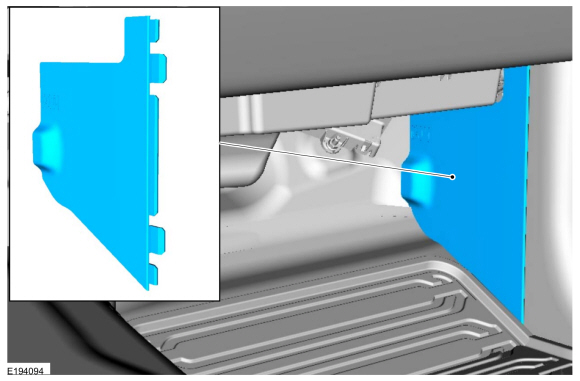 |
-
Remove and disconnect the lower access panel.
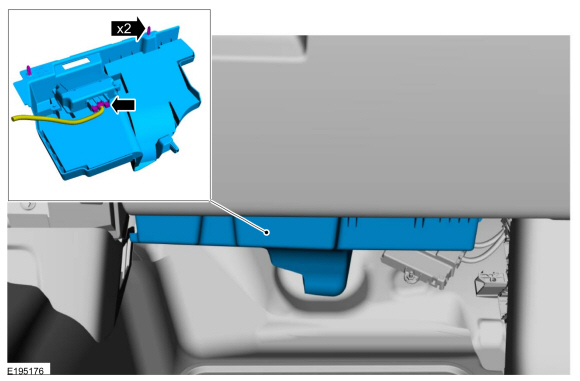 |
-
NOTE: The TCCM has slotted mounting holes. It is not necessary to remove the LH TCCM nut when removing the TCCM .
Loosen the LH (Left-hand) TCCM nut and remove the RH (right-hand) TCCM nut.
Torque: 62 lb.in (7 Nm)
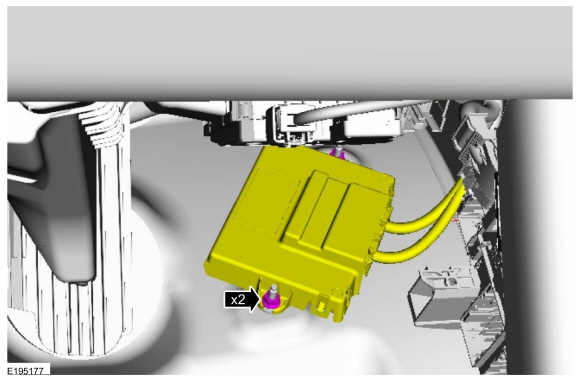 |
-
Disconnect the electrical connectors and remove the TCCM .
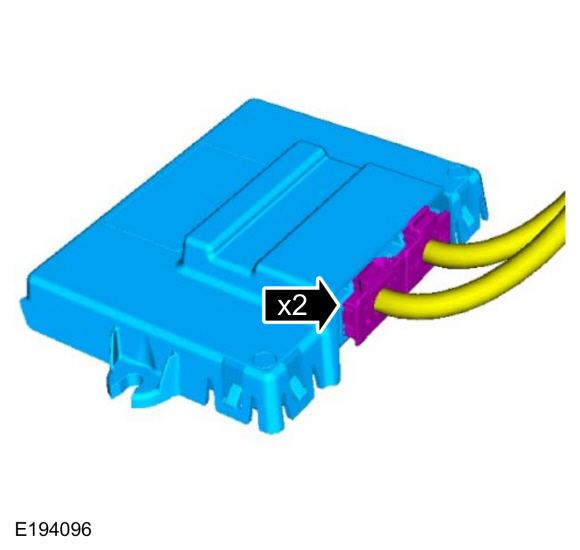 |
Installation
-
To install, reverse the removal procedure.
 All Terrain Control Module (ATCM). Removal and Installation
Special Tool(s) /
General Equipment
Interior Trim Remover
Removal
NOTE:
Removal steps in this procedure may contain installation details...
 Transfer Case Shift Motor. Removal and Installation
Removal
With the vehicle in NEUTRAL, position it on a hoist.
Refer to: Jacking and Lifting (100-02)
.
Disconnect the wiring harness connector...
Other information:
Lincoln Navigator 2018-2026 Workshop Manual: Auxiliary Power Point. Removal and Installation
Special Tool(s) / General Equipment 501-194Remover, Power PointTKIT-2014D-ROW2TKIT-2014D-FL_ROW Removal Open the power point cover. Position the power point extractor so that it engages in the adjacent slots in the power point socket...
Lincoln Navigator 2018-2026 Workshop Manual: Drive Pinion Seal. Removal and Installation
Special Tool(s) / General Equipment 205-208 (T83T-4676-A) Installer, Drive Pinion Oil SealTKIT-1983-FTKIT-1983-FLMTKIT-1983-FX Flat-Bladed Screwdriver Materials Name Specification Motorcraft® Premium Long-Life GreaseXG-1-E1 ESA-M1C75-B Removal Remove the drive pinion flange...
Categories
- Manuals Home
- 4th Gen Lincoln Navigator Service Manual (2018 - 2026)
- Vehicle Dynamics Control Module (VDM). Removal and Installation
- Telematics Control Unit (TCU) Module. Removal and Installation
- Neutral Flat Tow Activation and Deactivation. General Procedures
- All Terrain Control Module (ATCM). Removal and Installation
- Body Control Module (BCM). Removal and Installation
Axle Tube Bearing. Removal and Installation
Special Tool(s) / General Equipment
 205-123
(T78P-1177-A)
205-123
(T78P-1177-A)
Installer, Axle Shaft Oil Seal
 308-047
(T77F-1102-A)
308-047
(T77F-1102-A)
Remover, Bearing Cup Slide Hammer
