
Lincoln Navigator: Information and Entertainment System - General Information - Vehicles With: SYNC 4 / Telematics Control Unit (TCU) Module. Removal and Installation
Removal
NOTE: Removal steps in this procedure may contain installation details.
NOTE: If installing a new module, it is necessary to upload the module configuration information to the scan tool prior to removing the module. This information must be downloaded into the new module after installation.
-
Using a diagnostic scan tool, begin the PMI process for the TCU following the on-screen instructions.
-
Remove the front floor console.
Refer to: Floor Console (501-12 Instrument Panel and Console, Removal and Installation).
-
Disconnect the connectors, remove the push pins and the TCU .
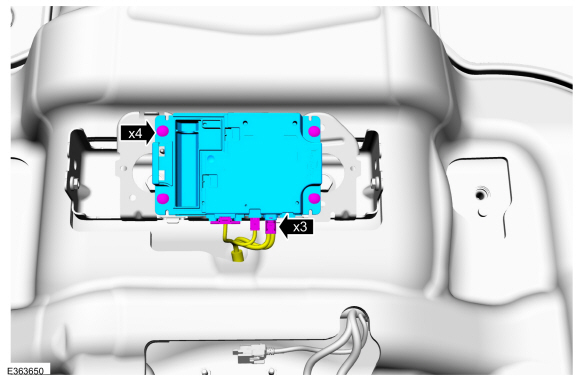 |
Installation
-
To install, reverse the removal procedure.
-
NOTE: This step is only necessary if replacing the TCU .
Using a diagnostic scan tool, complete the PMI process for the TCU following the on-screen instructions.
 SYNC Module [APIM] to Universal Serial Bus (USB) Port Cable. Removal and Installation
Special Tool(s) /
General Equipment
Interior Trim Remover
Removal
Upper USB cable
Remove the ACM .
Refer to: Audio Front Control Module (ACM) (415-00 Information and
Entertainment System - General Information - Vehicles With: SYNC 4,
Removal and Installation)...
 Telematics Control Unit (TCU) Module Antenna. Removal and Installation
Removal
NOTE:
Removal steps in this procedure may contain installation details.
Remove the instrument panel.
Refer to: Instrument Panel (501-12 Instrument Panel and Console, Removal and Installation)...
Other information:
Lincoln Navigator 2018-2026 Workshop Manual: Cowl Panel Grille. Removal and Installation
Removal Both sides Remove the wiper pivot arm. Refer to: Windshield Wiper Pivot Arm (501-16 Wipers and Washers, Removal and Installation). LH side Lift the cowl trim panel to release the underside pin-type retainers...
Lincoln Navigator 2018-2026 Workshop Manual: Battery. Removal and Installation
Removal NOTE: Removal steps in this procedure may contain installation details. Disconnect the battery. Refer to: Battery Disconnect and Connect (414-01 Battery, Mounting and Cables, General Procedures). Fully loosen and remove the battery hold-down bolt and clamp...
Categories
- Manuals Home
- 4th Gen Lincoln Navigator Service Manual (2018 - 2026)
- Telematics Control Unit (TCU) Module. Removal and Installation
- Neutral Flat Tow Activation and Deactivation. General Procedures
- Liftgate Trim Panel. Removal and Installation
- Transmission Fluid Drain and Refill. General Procedures
- Head Up Display (HUD) Module Calibration. General Procedures
Front Driveshaft. Removal and Installation
Special Tool(s) / General Equipment
Crimping ToolMaterials
Name Specification Motorcraft® Premium Long-Life GreaseXG-1-E1 ESA-M1C75-B
Removal
With the vehicle in NEUTRAL, position the vehicle on a hoist.Refer to: Jacking and Lifting (100-02 Jacking and Lifting, Description and Operation).
Remove the bolts and the transmission shield.
