
Lincoln Navigator: Glass, Frames and Mechanisms / Rear Door Window Glass. Removal and Installation
Special Tool(s) / General Equipment
| Interior Trim Remover |
Removal
NOTE: LH side shown, RH side similar.
-
Remove the fore rear door upper moulding.
Refer to: Rear Door Upper Moulding (501-08 Exterior Trim and Ornamentation, Removal and Installation).
-
Remove the rear door trim panel.
Refer to: Rear Door Trim Panel (501-05 Interior Trim and Ornamentation, Removal and Installation).
-
Remove the watershield.
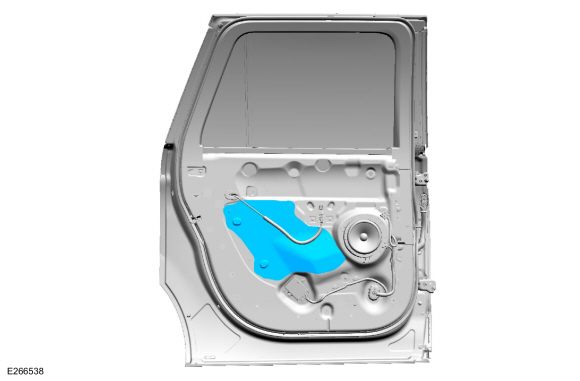 |
-
Lower the rear door window glass to full down position.
-
Connect the rear door trim panel wiring harness electrical connector.
-
Lower the rear door window glass to full down position.
-
Disconnect the rear door trim panel wiring harness electrical connector.
-
Connect the rear door trim panel wiring harness electrical connector.
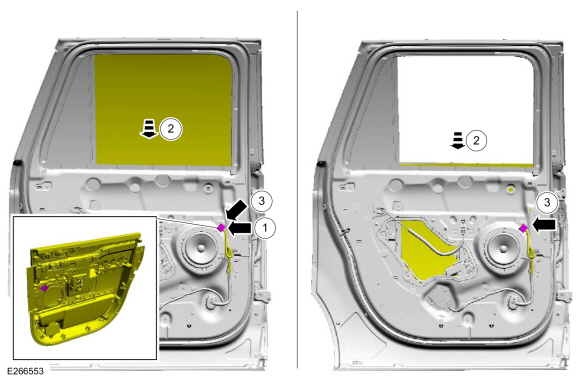 |
-
Remove the pin-type retainers and the upper interior rear door trim.
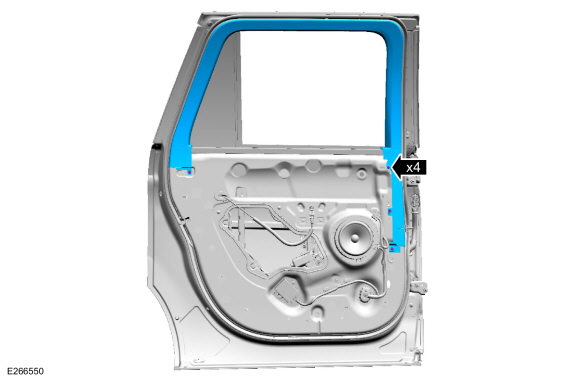 |
-
Remove the rear door inner belt moulding.
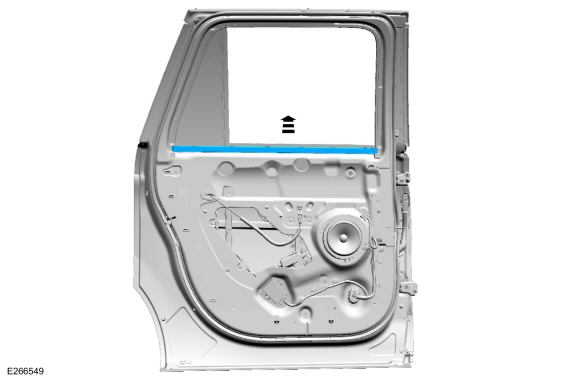 |
-
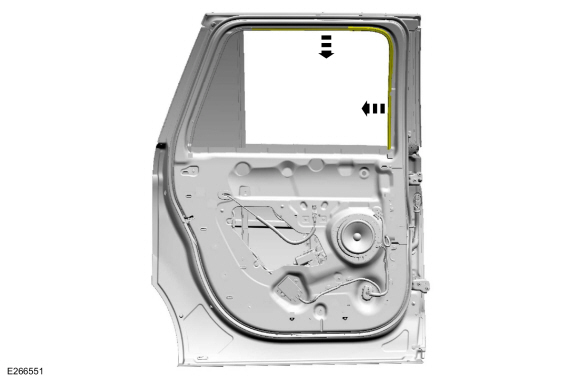
Position the rear door glass top run aside.
 |
-
Remove the rear door glass.
-
Connect the rear door trim panel wiring harness electrical connector.
-
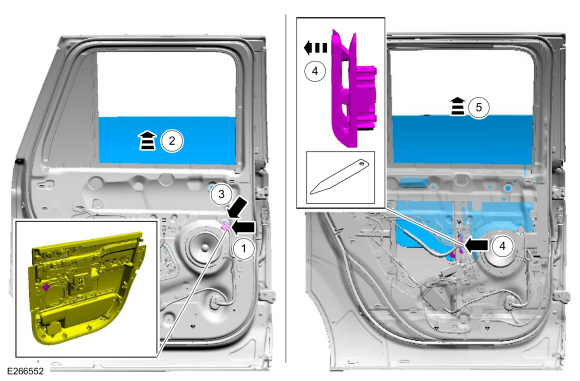
Raise the rear door window glass to half up position.
-
Disconnect the rear door trim panel wiring harness electrical connector.
-
Release the clip from rear door window glass.
Use the General Equipment: Interior Trim Remover
-
Remove the rear door glass.
-
Connect the rear door trim panel wiring harness electrical connector.
 |
Installation
-
To install, reverse the removal procedure.
-
Carry out the power door window initialization.
Refer to: Power Door Window Initialization (501-11 Glass, Frames and Mechanisms, General Procedures).
 Rear Door Window Control Switch. Removal and Installation
Removal
NOTE:
LH side shown, RH side similar.
Remove the rear door trim panel.
Refer to: Rear Door Trim Panel (501-05 Interior Trim and Ornamentation, Removal and Installation)...
 Rear Door Window Regulator Motor. Removal and Installation
Removal
NOTE:
LH side shown, RH side similar.
NOTE:
For non-functional rear door window regulators and motors
with the window in the 40 mm open to full closed position, cut the rear
door window regulator cables to allow window movement...
Other information:
Lincoln Navigator 2018-2026 Workshop Manual: Transfer Case - Overview. Description and Operation
Two-Speed Torque-On-Demand The 2-speed torque-on-demand transfer case consists of the following components: Mode Select Switch (MSS) Transfer Case Control Module (TCCM) Transfer case shift motor The Borg-Warner 2-speed torque-on-demand transfer case is a 2-piece magnesium design...
Lincoln Navigator 2018-2026 Workshop Manual: Rear Fender Splash Shield. Removal and Installation
Removal NOTE: Removal steps in this procedure may contain installation details. NOTE: LH side shown, RH side similar. All vehicles Remove the RH side rear wheel. Refer to: Wheel and Tire (204-04A Wheels and Tires, Removal and Installation)...
Categories
- Manuals Home
- 4th Gen Lincoln Navigator Service Manual (2018 - 2026)
- All Terrain Control Module (ATCM). Removal and Installation
- Head Up Display (HUD) Module Calibration. General Procedures
- Power Running Board (PRB). Diagnosis and Testing
- Rear View Mirrors - System Operation and Component Description. Description and Operation
- Transmission Fluid Drain and Refill. General Procedures
Rear Drive Axle and Differential. Diagnosis and Testing
Symptom Chart(s)
Diagnostics in this manual assume a certain skill level and knowledge of Ford-specific diagnostic practices.
REFER to: Diagnostic Methods (100-00 General Information, Description and Operation).
Symptom Chart - Differential
Symptom Chart - Differential
Condition Actions Axle overheating GO to Pinpoint Test A Broken gear teeth on the ring gear or pinion GO to Pi
