
Lincoln Navigator: Parking Aid - Vehicles With: Parking Aid Camera / Front Parking Aid Camera. Removal and Installation
Removal
-
Remove the front bumper cover.
Refer to: Front Bumper Cover (501-19 Bumpers, Removal and Installation).
-
Remove the screws and the bracket.
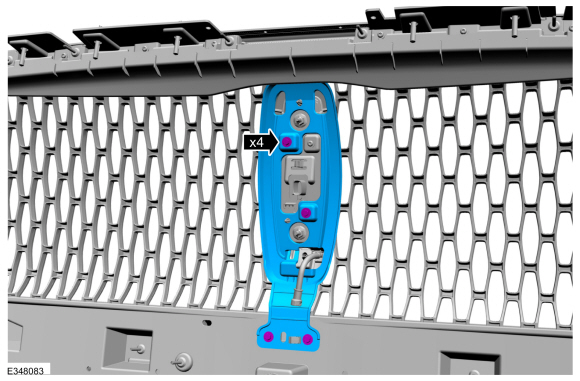 |
-
Remove the front parking aid camera and washer nozzle as an assembly.
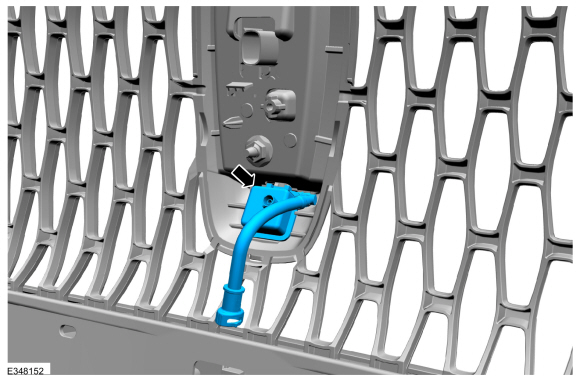 |
-
If equipped.
Remove the front parking aid camera washer nozzle.
 |
Installation
All vehicles
-
To install, reverse the removal procedure.
Vehicles equipped with front and rear only parking aid camera
-
Using a diagnostic scan tool, following the on
screen instructions for the LIN New Module Initialization-BCM initialize
the BCM .
Refer to: Parking Aid Camera Initialization (413-13B Parking Aid - Vehicles With: Parking Aid Camera, General Procedures).
Vehicles equipped with 360° cameras only
-
Using a diagnostic scan tool, following the on
screen instructions for the LIN New Module Initialization-IPMB
initialize the IPMB .
Refer to: Parking Aid Camera Initialization (413-13B Parking Aid - Vehicles With: Parking Aid Camera, General Procedures).
-
Align the 360° cameras.
Refer to: 360 Degree View Camera Alignment (413-13B Parking Aid - Vehicles With: Parking Aid Camera, General Procedures).
Vehicles equipped with 360° camera and Trailer Reverse Guidance
-
Using a diagnostic scan tool, following the on
screen instructions for the LIN New Module Initialization-IPMB
initialize the IPMB .
Refer to: Parking Aid Camera Initialization (413-13B Parking Aid - Vehicles With: Parking Aid Camera, General Procedures).
-
Align the 360° cameras.
Refer to: 360 Degree View Camera Alignment (413-13B Parking Aid - Vehicles With: Parking Aid Camera, General Procedures).
 Parking Aid Camera Initialization. General Procedures
NOTE:
On vehicles equipped with Trailer Reverse Guidance (TRG)
complete this procedure and also perform the Trailer Reverse Guidance
camera alignment...
 Rear Parking Aid Camera. Removal and Installation
Removal
NOTE:
Removal steps in this procedure may contain installation details.
Remove the reversing lamp.
Refer to: Reversing Lamp (417-01 Exterior Lighting, Removal and Installation)...
Other information:
Lincoln Navigator 2018-2026 Workshop Manual: Body Control Module C (BCMC). Removal and Installation
Removal NOTE: Removal steps in this procedure may contain installation details. NOTE: If the BCMC (body control module C) did not respond to the diagnostic scan tool, As-Built Data may need to be entered as part of the repair...
Lincoln Navigator 2018-2026 Workshop Manual: Third Row Center Seatbelt Retractor - Long Wheelbase. Removal and Installation
Removal NOTE: Removal steps in this procedure may contain installation details. Lower the headliner. Refer to: Headliner - Lowering (501-05 Interior Trim and Ornamentation, Removal and Installation). Remove the bolts and the third row center seatbelt retractor...
Categories
- Manuals Home
- 4th Gen Lincoln Navigator Service Manual (2018 - 2026)
- Telematics Control Unit (TCU) Module. Removal and Installation
- Remote Function Actuator (RFA) Module. Removal and Installation
- Rear Bumper. Removal and Installation
- Brake Service Mode Activation and Deactivation. General Procedures
- Body Control Module (BCM). Removal and Installation
Rear Drive Axle and Differential. Diagnosis and Testing
Symptom Chart(s)
Diagnostics in this manual assume a certain skill level and knowledge of Ford-specific diagnostic practices.
REFER to: Diagnostic Methods (100-00 General Information, Description and Operation).
Symptom Chart - Differential
Symptom Chart - Differential
Condition Actions Axle overheating GO to Pinpoint Test A Broken gear teeth on the ring gear or pinion GO to Pi
