
Lincoln Navigator: Glass, Frames and Mechanisms / Front Door Glass Top Run. Removal and Installation
Removal
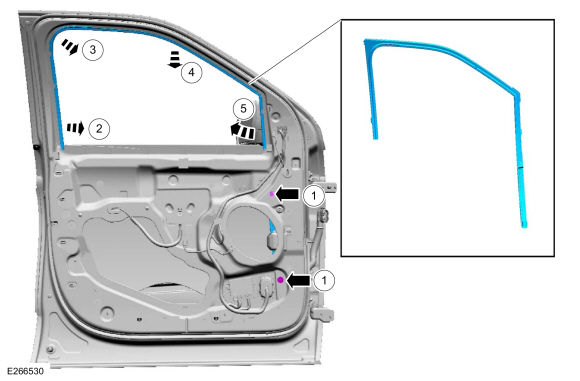
NOTE: LH side shown, RH side similar.
NOTE: Removal steps in this procedure may contain installation details.
-
Remove the front door window regulator and motor.
Refer to: Front Door Window Regulator and Motor (501-11 Glass, Frames and Mechanisms, Removal and Installation).
-
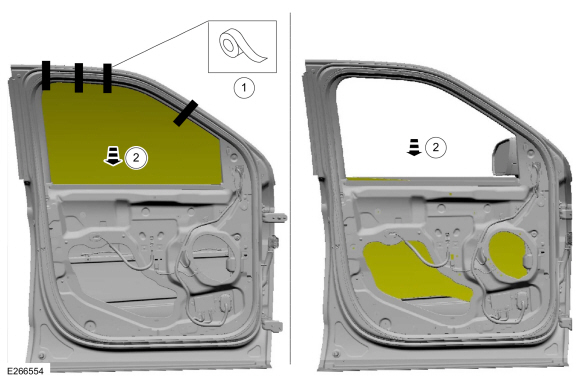
Remove tape and lower the front door window glass to full down position.
-
Remove tape.
-
Lower the front door window glass to full down position.
-
Remove tape.
 |
-
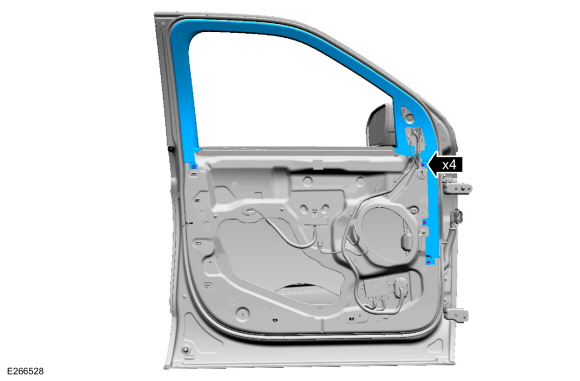
Remove the pin-type retainers and the front door upper trim.
 |
-
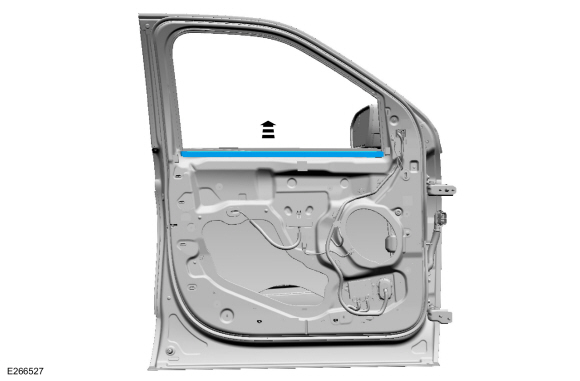
Remove the front door inner belt moulding.
 |
-
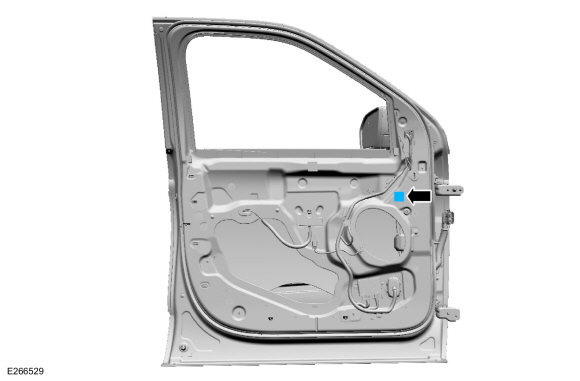
Remove the front door glass top run bolt adhesive cover.
 |
-
Remove the front door glass top run.
-
Remove the front door glass top run bolts.
Torque: 71 lb.in (8 Nm)
-
Release the front door glass top run from the door run channel.
-
Release the front door glass top run from the door run channel.
-
Release the front door glass top run from the door run channel.
-
Remove the front door glass top run.
-
Remove the front door glass top run bolts.
 |
Installation
-
To install, reverse the removal procedure.
-
Carry out the power door window initialization.
Refer to: Power Door Window Initialization (501-11 Glass, Frames and Mechanisms, General Procedures).
 Front Door Glass Run and Bracket. Removal and Installation
Removal
NOTE:
LH side shown, RH side similar.
Remove the front door latch.
Refer to: Front Door Latch (501-14 Handles, Locks, Latches and Entry Systems, Removal and Installation)...
 Front Door Window Glass. Removal and Installation
Removal
NOTE:
LH side shown, RH side similar.
Remove the front door glass top run.
Refer to: Front Door Glass Top Run (501-11 Glass, Frames and Mechanisms, Removal and Installation)...
Other information:
Lincoln Navigator 2018-2026 Workshop Manual: Electronic Engine Controls - Overview. Description and Operation
Overview The EEC system provides optimum control of the engine through the enhanced capability of the powertrain control module (PCM). The EEC system also has an on board diagnostic (OBD) monitoring system with features and functions to meet federal regulations on exhaust emissions...
Lincoln Navigator 2018-2026 Workshop Manual: Rear Air Discharge Temperature Sensor. Removal and Installation
Removal NOTE: Removal steps in this procedure may contain installation details. Remove the RH c-pillar trim panel. Refer to: C-Pillar Trim Panel (501-05 Interior Trim and Ornamentation, Removal and Installation). Disconnect the electrical connector and remove the rear air discharge temperature sensor...
Categories
- Manuals Home
- 4th Gen Lincoln Navigator Service Manual (2018 - 2026)
- Brake Service Mode Activation and Deactivation. General Procedures
- Windshield Washer Pump. Removal and Installation
- Remote Function Actuator (RFA) Module. Removal and Installation
- Front Seat. Removal and Installation
- Front Bumper Cover. Removal and Installation
Wheel to Hub Runout Minimization. General Procedures
Check
NOTE: Wheel-to-hub optimization is important. Clearance between the wheel and hub can be used to offset or neutralize the Road Force® or run-out of the wheel and tire assembly. For every 0.001 inch of wheel-to-hub clearance, the Road Force® can be affected between 1 and 3 pounds depending on the tire stiffness.
NOTE: The example below illustrates how the clearance between the wheel and the hub can be used to offset the high spot of radial run-out or Road Force®. Following the procedure will make sure of the best optimization.
Position the wheel and tire assembly on the vehicle so that the high spot location of radial run-out or Road Force® is at the 6 o'clock position and