
Lincoln Navigator: Interior Trim and Ornamentation / C-Pillar Trim Panel. Removal and Installation
Special Tool(s) / General Equipment
| Interior Trim Remover |
Removal
NOTE: Left hand (LH) shown, right hand (RH) similar.
NOTE: Removal steps in this procedure may contain installation details.
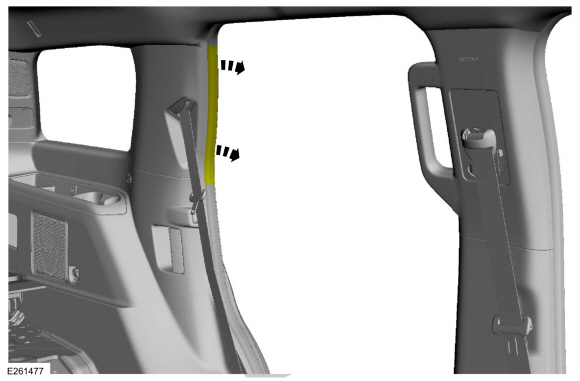
-
Position the rear door weatherstrip aside.
 |
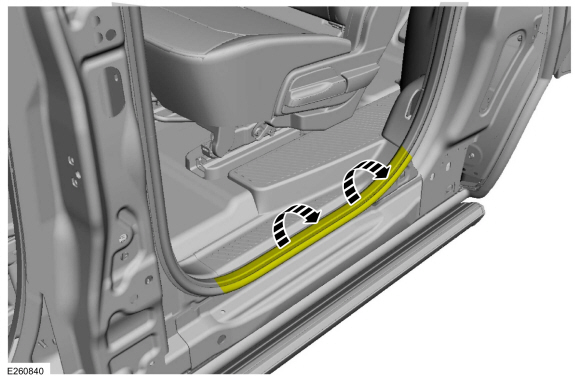
-
Position the rear door weatherstrip aside.
 |
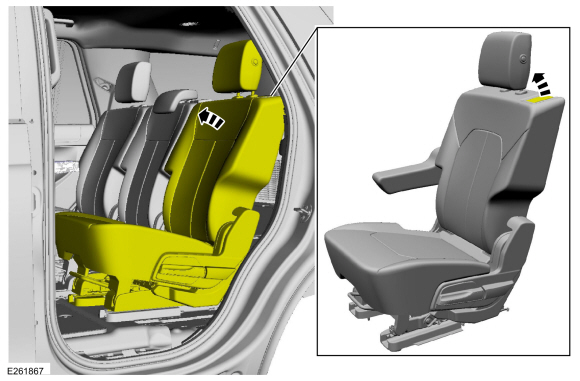
-
Position the second row seat forward.
 |
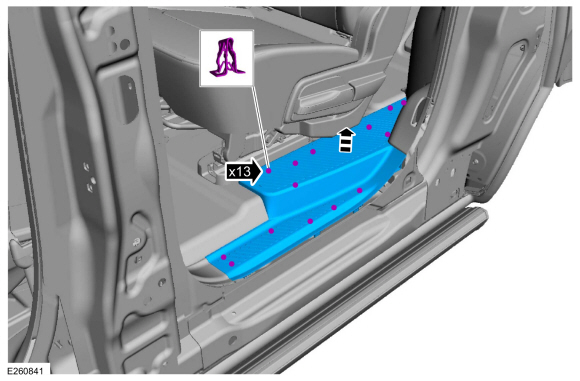
-
NOTE: Long wheelbase shown, short wheelbase similar.
Release the clips and remove the rear door scuff plate trim panel.
 |
-
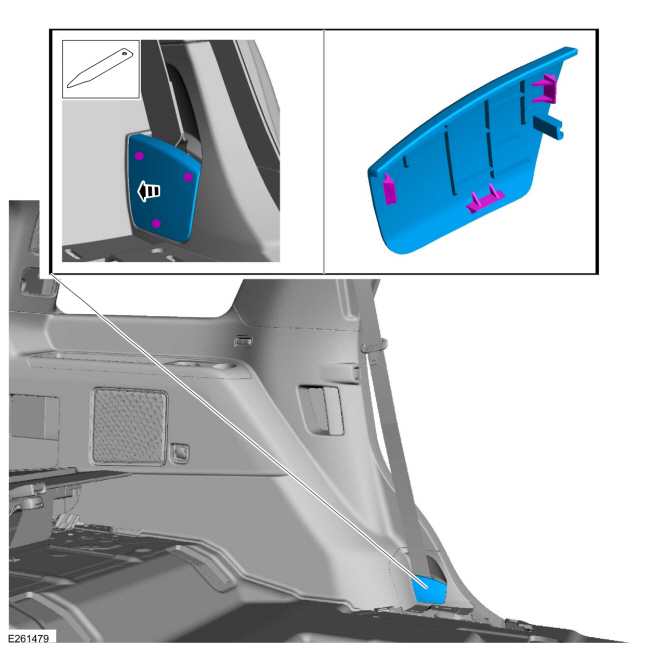
Release the tabs and remove the second row seatbelt anchor cover.
Use the General Equipment: Interior Trim Remover
 |
-
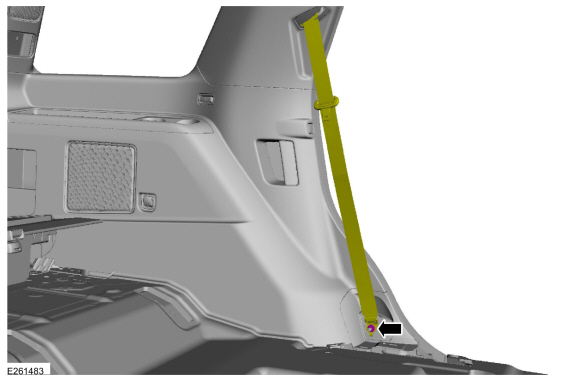
Remove the anchor nut and position the second row outer seatbelt retractor aside.
Torque: 30 lb.ft (40 Nm)
 |
-
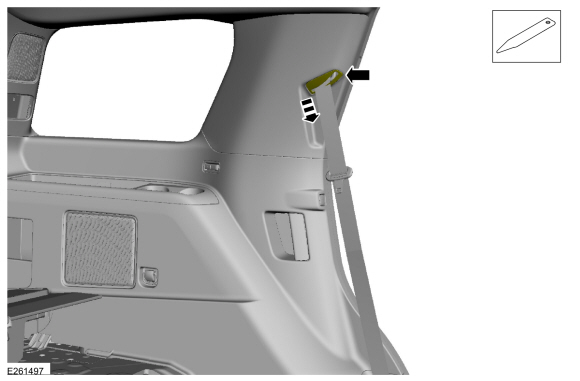
Position the second row outer seatbelt retractor guide cover down on the seatbelt.
Use the General Equipment: Interior Trim Remover
 |
-
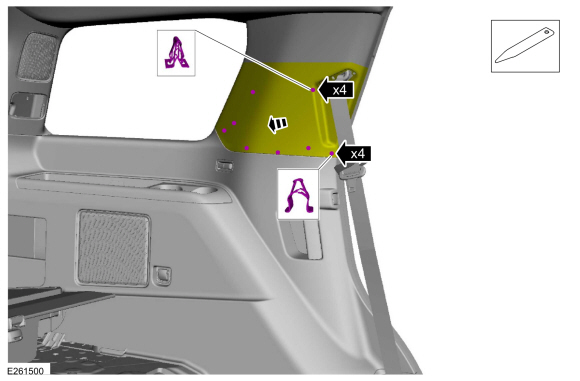
Release the lower and the middle C-pillar trim panel clips.
Use the General Equipment: Interior Trim Remover
 |
-
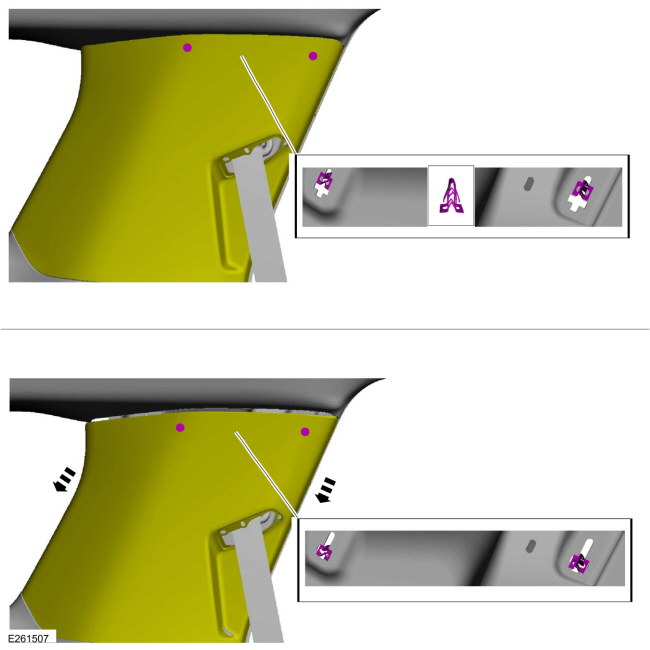
NOTICE: The C-pillar trim panel must be positioned downward to allow the upper clips to release correctly. Failure to follow this direction may cause damage to the C-pillar trim panel.
Slide the C-pillar trim panel down, aligning the clips to the slots in the sheet metal.
 |
-
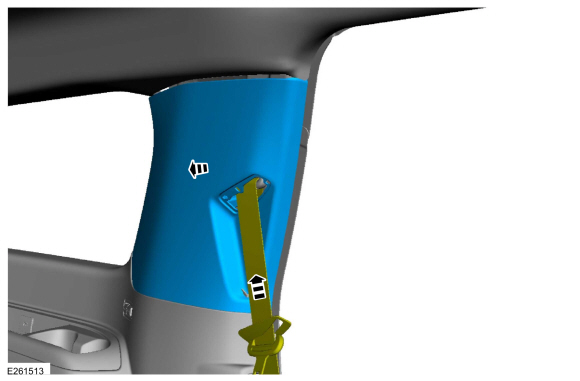
Remove the C-pillar trim panel while feeding the second row outer seatbelt retractor through the opening.
 |
Installation
-
NOTE: During installation, make sure the seatbelt webbing is not twisted and the seatbelts and buckles are accessible to the occupants.
To install, reverse the removal procedure.
-
Check the seatbelt system for correct operation.
Refer to: Seatbelt Systems (501-20A Seatbelt Systems, Diagnosis and Testing).
 B-Pillar Trim Panel. Removal and Installation
Special Tool(s) /
General Equipment
Flat-Bladed Screwdriver
Interior Trim Remover
Removal
NOTE:
LH (left hand) side shown, RH (right hand) side similar...
 D-Pillar Trim Panel - Short Wheelbase. Removal and Installation
Special Tool(s) /
General Equipment
Flat-Bladed Screwdriver
Interior Trim Remover
Removal
NOTE:
RH shown, LH similar...
Other information:
Lincoln Navigator 2018-2026 Workshop Manual: Front Seat Cushion Bolster - Vehicles With: Multi-Contour Seats. Removal and Installation
Removal NOTE: Driver seat shown, passenger seat similar. Remove the front seat cushion cover. Refer to: Front Seat Cushion Cover (501-10A Front Seats, Removal and Installation). Remove the pin-type retainers and the front seat cushion bolster(s)...
Lincoln Navigator 2018-2026 Workshop Manual: Evaporative Emission Blocking Valve. Removal and Installation
Removal Remove the fuel tank. Refer to: Fuel Tank (310-01 Fuel Tank and Lines - 3.5L EcoBoost (272kW/370PS), Removal and Installation). Disconnect the EVAP quick connect coupling. Refer to: Quick Release Coupling (310-00) ...
Categories
- Manuals Home
- 4th Gen Lincoln Navigator Service Manual (2018 - 2026)
- Front Bumper Cover. Removal and Installation
- Vehicle Dynamics Control Module (VDM). Removal and Installation
- SYNC Module [APIM]. Removal and Installation
- Identification Codes. Description and Operation
- Remote Function Actuator (RFA) Module. Removal and Installation
Diagnostic Methods. Description and Operation
This document provides critical diagnostic knowledge required for successful repair outcomes. It identifies technical competencies expected by users of this manual.
Ford Diagnostic Assumptions
Ford diagnostics assume the vehicle concern described by the test title is currently present. Exceptions to this rule are noted in each test. Do not replace modules or other components as directed by a diagnostic if the concern is not present at the time of testing.
