
Lincoln Navigator: Passive Anti-Theft System (PATS) - Vehicles With: Phone as a Key / Bluetooth Front Interior Antenna. Removal and Installation
Removal
NOTE: RH (right hand) shown, LH (left hand) similar.
-
Remove the front door trim panel.
Refer to: Front Door Trim Panel (501-05 Interior Trim and Ornamentation, Removal and Installation).
-
Remove the bluetooth front interior antenna.
-
Disconnect the bluetooth front interior antenna electrical connector.
-
Release the bluetooth front interior antenna tab.
-
Slide the bluetooth front interior antenna off bracket.
-
Disconnect the bluetooth front interior antenna electrical connector.
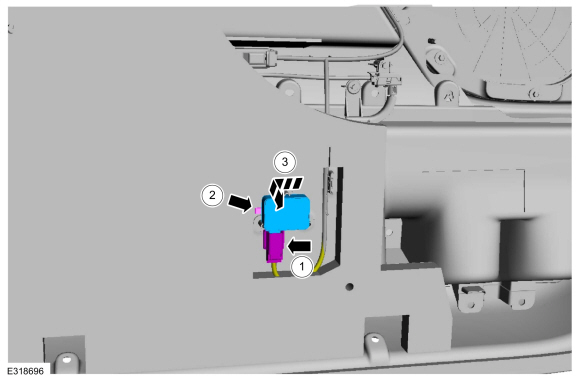 |
Installation
-
To install, reverse the removal procedure.
-
Using the diagnostic scan tool, carry out the remote function actuator (RFA) module self test.
 Bluetooth Front Exterior Antenna. Removal and Installation
Special Tool(s) /
General Equipment
Interior Trim Remover
Removal
Remove the front bumper cover.
Refer to: Front Bumper Cover (501-19 Bumpers, Removal and Installation)...
 Bluetooth Rear Exterior Antenna. Removal and Installation
Special Tool(s) /
General Equipment
Interior Trim Remover
Removal
Remove the rear bumper cover.
Refer to: Rear Bumper Cover (501-19 Bumpers, Removal and Installation)...
Other information:
Lincoln Navigator 2018-2026 Workshop Manual: Glass, Frames and Mechanisms - Overview. Description and Operation
Overview Delayed Accessory Feature The power windows operate only when the delayed accessory feature is active. The delayed accessory feature is active whenever the ignition is ON, or up to 10 minutes after the ignition is changed from ON to OFF while the front driver and passenger doors remain closed...
Lincoln Navigator 2018-2026 Workshop Manual: Tie Rod. Removal and Installation
Special Tool(s) / General Equipment Boot Clamp Pliers Materials Name Specification Motorcraft® Premium Long-Life GreaseXG-1-E1 ESA-M1C75-B Removal Remove the tie rod end. Refer to: Tie Rod End (211-02 Power Steering, Removal and Installation)...
Categories
- Manuals Home
- 4th Gen Lincoln Navigator Service Manual (2018 - 2026)
- Transmission Fluid Drain and Refill. General Procedures
- Liftgate Trim Panel. Removal and Installation
- Vehicle Dynamics Control Module (VDM). Removal and Installation
- Neutral Flat Tow Activation and Deactivation. General Procedures
- Body Control Module (BCM). Removal and Installation
Front Driveshaft. Removal and Installation
Special Tool(s) / General Equipment
Crimping ToolMaterials
Name Specification Motorcraft® Premium Long-Life GreaseXG-1-E1 ESA-M1C75-B
Removal
With the vehicle in NEUTRAL, position the vehicle on a hoist.Refer to: Jacking and Lifting (100-02 Jacking and Lifting, Description and Operation).
Remove the bolts and the transmission shield.
