
Lincoln Navigator: Information and Entertainment System - General Information - Vehicles With: SYNC 4 / Audio Digital Signal Processing (DSP) Module. Removal and Installation
Removal
NOTE: Removal steps in this procedure may contain installation details.
-
NOTE: If installing a new module, it is necessary to upload the module configuration information to the scan tool prior to removing the module. This information must be downloaded into the new module after installation.
Using the diagnostic scan tool, begin the PMI process for the DSP following the on-screen instructions.
-
Remove the subwoofer speaker.
Refer to: Subwoofer Speaker (415-00 Information and Entertainment System - General Information - Vehicles With: SYNC 4, Removal and Installation).
-
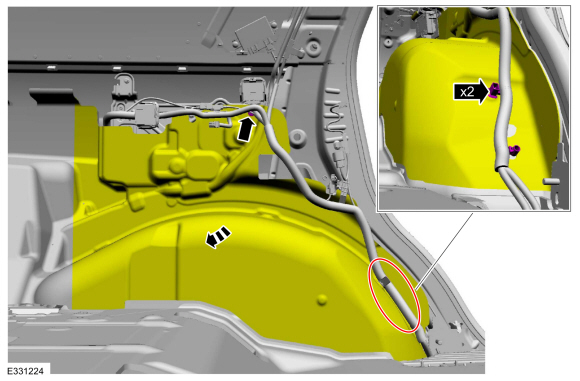
Release the wire guides, remove the pin type retainer and position the insulation aside.
 |
-
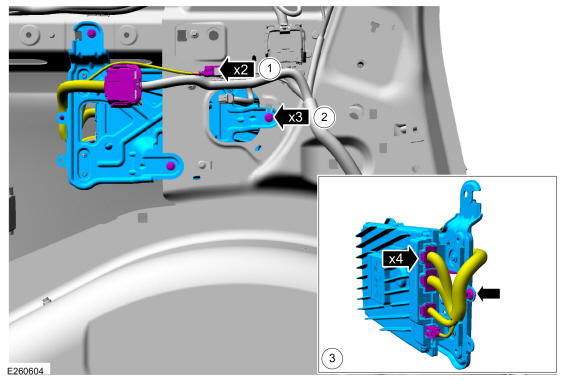
Remove the DSP and bracket assembly.
-
Disconnect the electrical connectors.
-
Remove the screws and the DSP and bracket assembly.
Torque: 62 lb.in (7 Nm)
-
Disconnect the electrical connectors, separate the wire guide and remove the DSP harness.
-
Disconnect the electrical connectors.
 |
-
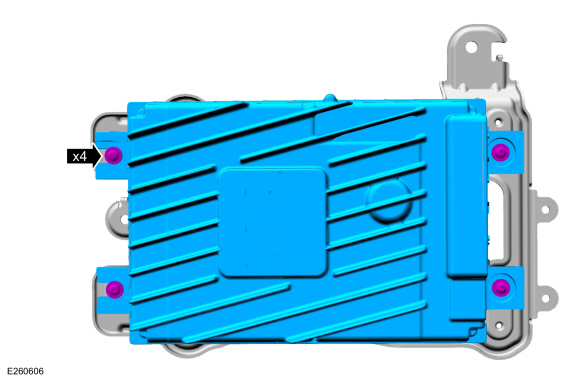
Remove the screws and the DSP .
 |
Installation
-
To install, reverse the removal procedure.
-
NOTE: This step is only necessary when installing a new component.
Using a diagnostic scan tool, complete the PMI process for the DSP following the on-screen instructions.
 Active Noise Control Microphone. Removal and Installation
Removal
Lower the headliner.
Refer to: Headliner - Lowering (501-05 Interior Trim and Ornamentation, Removal and Installation).
Disconnect the electrical connector, release the tabs and remove the active noise control microphone...
 Audio Front Control Module (ACM). Removal and Installation
Special Tool(s) /
General Equipment
Interior Trim Remover
Removal
NOTE:
Removal steps in this procedure may contain installation details...
Other information:
Lincoln Navigator 2018-2026 Workshop Manual: Roof Opening Panel. Diagnosis and Testing
Global Customer Symptom Code (GCSC) Chart Diagnostics in this manual assume a certain skill level and knowledge of Ford-specific diagnostic practices. REFER to: Diagnostic Methods (100-00 General Information, Description and Operation). Symptom Action Fit/Finish/Body > Noise > Roof/Roof Opening > Always GO to Pinpoint Test A Fit/Finish/Body > No..
Lincoln Navigator 2018-2026 Workshop Manual: Cylinder Head RH. Removal and Installation
Special Tool(s) / General Equipment Long Nose Pliers Materials Name Specification Motorcraft® Silicone Gasket RemoverZC-30-A, AZC-30-C - Motorcraft® Metal Surface Prep WipesZC-31-B - Removal NOTICE: During engine repair procedures, cleanliness is extremely important. Any foreign material, including any material c..
Categories
- Manuals Home
- 4th Gen Lincoln Navigator Service Manual (2018 - 2026)
- Transmission Fluid Level Check. General Procedures
- Rear View Mirrors - System Operation and Component Description. Description and Operation
- Body Control Module (BCM). Removal and Installation
- Vehicle Dynamics Control Module (VDM). Removal and Installation
- Front Seat. Removal and Installation
Front Driveshaft. Removal and Installation
Special Tool(s) / General Equipment
Crimping ToolMaterials
Name Specification Motorcraft® Premium Long-Life GreaseXG-1-E1 ESA-M1C75-B
Removal
With the vehicle in NEUTRAL, position the vehicle on a hoist.Refer to: Jacking and Lifting (100-02 Jacking and Lifting, Description and Operation).
Remove the bolts and the transmission shield.
