Lincoln Navigator: Information and Entertainment System - General Information - Vehicles With: SYNC 4 / Subwoofer Speaker. Removal and Installation
Removal
-
Remove the LH loadspace trim panel.
Refer to: Loadspace Trim Panel (501-05 Interior Trim and Ornamentation, Removal and Installation).
-
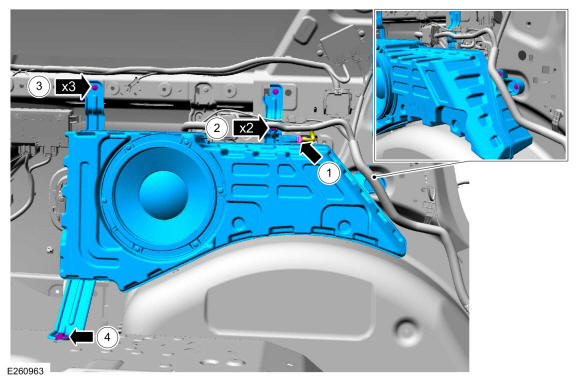
Remove the subwoofer speaker.
-
Disconnect the electrical connector.
-
Separate the wire harness guides.
-
Remove the upper and forward subwoofer bolts.
Torque: 62 lb.in (7 Nm)
-
Remove the lower subwoofer bolt.
Torque: 62 lb.in (7 Nm)
-
Disconnect the electrical connector.
 |
Installation
-
To install, reverse the removal procedure.
 Satellite Radio / Global Positioning System (GPS) Splitter / Cable. Removal and Installation
Removal
NOTE:
Removal steps in this procedure may contain installation details.
Remove the ACM .
Refer to: Information and Entertainment System - Component Location
(415-00 Information and Entertainment System - General Information -
Vehicles With: SYNC 4, Description and Operation)...
 SYNC Module [APIM]. Removal and Installation
Removal
NOTE:
Removal steps in this procedure may contain installation details.
NOTE:
If installing a new module, it is necessary to
upload the module configuration information to the scan tool prior to
removing the module...
Other information:
Lincoln Navigator 2018-2026 Workshop Manual: Passive Anti-Theft System (PATS). Diagnosis and Testing
Diagnostic Trouble Code (DTC) Chart Diagnostics in this manual assume a certain skill level and knowledge of Ford-specific diagnostic practices. REFER to: Diagnostic Methods (100-00 General Information, Description and Operation). REFER to: Passive Anti-Theft System (PATS) - System Operation and Component Description (419-01B Passive Anti-Theft System (PATS), Description and Operation)...
Lincoln Navigator 2018-2026 Workshop Manual: Wheels and Tires. Diagnosis and Testing
Preliminary Inspection Verify the customer concern by carrying out a road test on a smooth road. If any vibrations are apparent, Refer to the Symptom Chart: NVH. To maximize tire performance, inspect for signs of incorrect inflation and uneven wear, which may indicate a need for balancing, rotation or front suspension alignment...
Categories
- Manuals Home
- 4th Gen Lincoln Navigator Service Manual (2018 - 2026)
- Rear View Mirrors - System Operation and Component Description. Description and Operation
- Brake Service Mode Activation and Deactivation. General Procedures
- Liftgate Trim Panel. Removal and Installation
- Identification Codes. Description and Operation
- Front Bumper Cover. Removal and Installation
Rear Stabilizer Bar Link. Removal and Installation
Removal
NOTE: Removal steps in this procedure may contain installation details.
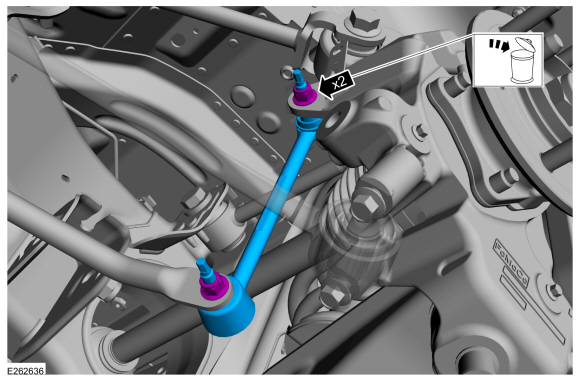
With the vehicle in NEUTRAL, position it on a hoist.Refer to: Jacking and Lifting (100-02 Jacking and Lifting, Description and Operation).
NOTE: Use the hex-holding feature to prevent the stud from turning while removing the nut.
Remove and discard the 2 rear stabilizer bar link nuts and remove the rear stabilizer bar link.Torque: 46 lb.ft (63 Nm)