
Lincoln Navigator: Steering Column / Steering Column Telescopic Motor. Removal and Installation
Removal
NOTE: Removal steps in this procedure may contain installation details.
-
Remove the steering column.
Refer to: Steering Column (211-04 Steering Column, Removal and Installation).
-
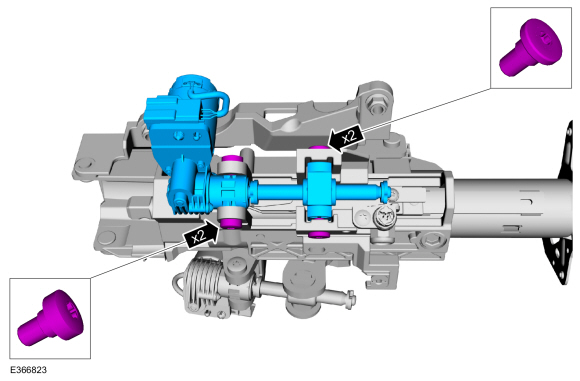
Remove the telescopic motor retainers and the telescopic motor.
Torque: 62 lb.in (7 Nm)
 |
Installation
-
To install, reverse the removal procedure.
-
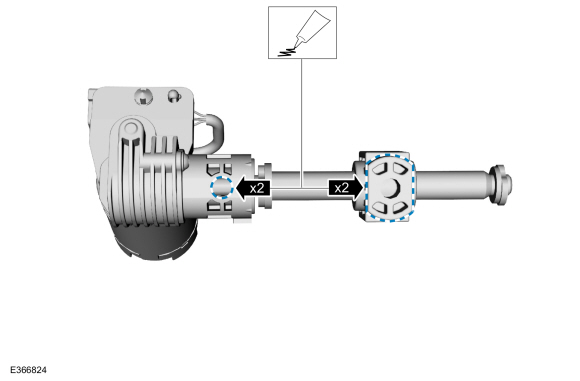
Apply grease (supplied with the new motor) to the
trunnion nut axles and the telescopic motor leadscrew housing holes.
 |
-
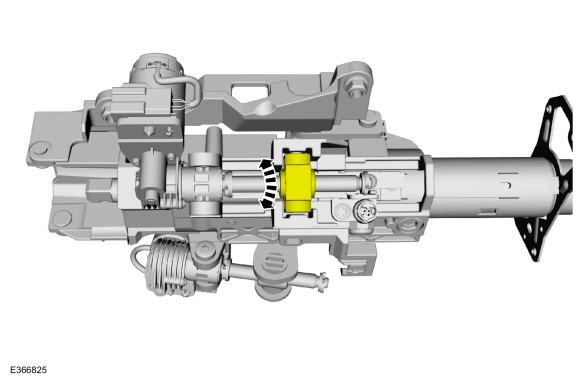
Rotate the trunnion nut until the correct length is
achieved to align the leadscrew housing with the threaded holes in the
support arm.
 |
-
If equipped with memory steering column, use the
steering column control switch and set the soft stops as follows.
-
Move the column rearward until it reaches the end of
travel and hold the switch for 2 seconds after the column has reached
the end of travel.
-
Move the column in the same direction until it
reaches the end of travel again and hold the switch for 2 seconds after
the motor has reached the end of travel. This clears any unintended soft
stops.
-
Move the column forward until it reaches the end of
travel and hold the switch for 2 seconds after the motor has reached the
end of travel.
-
Move the column in the same direction until it
reaches the end of travel and hold the switch for 2 seconds after the
motor has reached the end of travel. This clears any unintended soft
stops.
-
Move the column rearward until it reaches the end of
travel and hold the switch for 2 seconds after the column has reached
the end of travel.
 Steering Column - Remove for Access. Removal and Installation
Special Tool(s) /
General Equipment
Interior Trim Remover
Depower the SRS .
Refer to: Supplemental Restraint System (SRS) Depowering (501-20B Supplemental Restraint System, General Procedures)...
 Steering Column Tilt Motor. Removal and Installation
Removal
NOTE:
Removal steps in this procedure may contain installation details.
Remove the steering column.
Refer to: Steering Column (211-04 Steering Column, Removal and Installation)...
Other information:
Lincoln Navigator 2018-2026 Workshop Manual: Battery and Cables - System Operation and Component Description. Description and Operation
System Operation Battery and Cables The battery and cable system consists of the following components: Battery Battery tray Battery monitoring sensor Negative battery cable Positive battery cable High current BJB Vehicles are equipped with a 12-volt, maintenance-free battery...
Lincoln Navigator 2018-2026 Workshop Manual: Vehicle Dynamic Suspension - Component Location. Description and Operation
Item Description 1 Front Shock Absorber (2 required) 2 Front height sensor (2 required) 3 VDM 4 Rear height sensor (2 required) 5 Rear Shock Absorber (2 required) ..
Categories
- Manuals Home
- 4th Gen Lincoln Navigator Service Manual (2018 - 2026)
- Body Control Module (BCM). Removal and Installation
- Remote Function Actuator (RFA) Module. Removal and Installation
- Vehicle Dynamics Control Module (VDM). Removal and Installation
- Power Running Board (PRB). Diagnosis and Testing
- Transmission Fluid Level Check. General Procedures
Front Driveshaft. Removal and Installation
Special Tool(s) / General Equipment
Crimping ToolMaterials
Name Specification Motorcraft® Premium Long-Life GreaseXG-1-E1 ESA-M1C75-B
Removal
With the vehicle in NEUTRAL, position the vehicle on a hoist.Refer to: Jacking and Lifting (100-02 Jacking and Lifting, Description and Operation).
Remove the bolts and the transmission shield.
