
Lincoln Navigator: Suspension System - General Information / Rear Camber Adjustment. General Procedures
Special Tool(s) / General Equipment
| Wheel Alignment System |
Activation
NOTICE: Suspension fasteners are critical parts that affect the performance of vital components and systems. Failure of these fasteners may result in major service expense. Use the same or equivalent parts if replacement is necessary. Do not use a replacement part of lesser quality or substitute design. Tighten fasteners as specified.
-
Using alignment equipment and the manufacturer's instructions, measure the rear camber.
Use the General Equipment: Wheel Alignment System
-
Remove the upper arm-to-frame bolt and the camber set shim.
-
Discard the camber set shim.
-
Install and snug the upper arm-to frame bolt.
-
Discard the camber set shim.
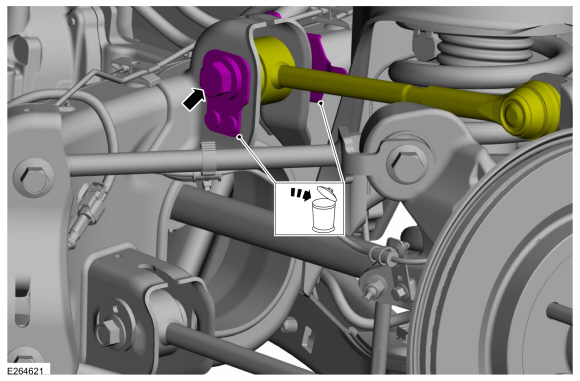 |
-
NOTE: Do not allow the upper arm to move and change the camber adjustment setting when tightening the bolt.
Position the upper arm-to-frame bolt in the upper arm-to-frame slot until the camber setting is within specification.
-
Move the upper arm inboard or outboard to adjust rear camber as necessary.
-
Install and tighten the upper arm-to-frame bolt
Torque: 166 lb.ft (225 Nm)
-
Move the upper arm inboard or outboard to adjust rear camber as necessary.
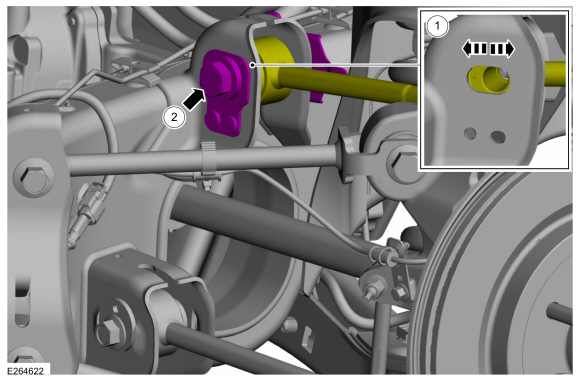 |
-
Recheck alignment to verify camber change and adjust rear toe if necessary.
Refer to: Rear Toe Adjustment (204-00 Suspension System - General Information, General Procedures).
 Front Toe Adjustment. General Procedures
Special Tool(s) /
General Equipment
Wheel Alignment System
Adjustment
NOTE:
Make sure that the vehicle is standing on a level surface...
 Rear Toe Adjustment. General Procedures
Special Tool(s) /
General Equipment
Wheel Alignment System
Activation
NOTICE:
Do not use any tools or equipment to move the wheel and tire
assembly or suspension components while checking for relative movement...
Other information:
Lincoln Navigator 2018-2026 Workshop Manual: Third Row Single Seat Backrest. Removal and Installation
Removal Remove the third row single seat backrest cover. Refer to: Third Row Single Seat Backrest Cover (501-10C) . Remove the third row single seat frame. Refer to: Third Row Single Seat Frame (501-10C Third Row Seats, Removal and Installation)...
Lincoln Navigator 2018-2026 Workshop Manual: Fuel Pump and Sender Unit. Removal and Installation
Special Tool(s) / General Equipment 310-123Locking Ring, Fuel TankTKIT-2004J-FTKIT-2005U-LM Removal NOTE: Removal steps in this procedure may contain installation steps. Remove the Fuel Tank. Refer to: Fuel Tank (310-01 Fuel Tank and Lines - 3...
Categories
- Manuals Home
- 4th Gen Lincoln Navigator Service Manual (2018 - 2026)
- Windshield Washer Pump. Removal and Installation
- Body and Paint
- Vehicle Dynamics Control Module (VDM). Removal and Installation
- All Terrain Control Module (ATCM). Removal and Installation
- Identification Codes. Description and Operation
Differential Case Runout Check. General Procedures
Special Tool(s) / General Equipment
 205-1016
Installer, Differential Bearing
TKIT-2014D-ROW2
TKIT-2014D-FL_ROW
 205-153
(T80T-4000-W)
205-153
(T80T-4000-W)
Handle
 205-D061
(D83T-4205-C2)
205-D061
(D83T-4205-C2)
Step Plate Dial Indicator Three Leg Puller Punch
