
Lincoln Navigator: Electronic Engine Controls - 3.5L EcoBoost (272kW/370PS) / Powertrain Control Module (PCM). Removal and Installation
Special Tool(s) / General Equipment
| Ford Diagnostic Equipment |
Removal
-
NOTE: Removal steps in this procedure may contain installation details.
If installing a new PCM , connect a battery charger to the battery to make sure it is charged to maintain proper battery voltage.
Refer to: Battery Charging (414-01 Battery, Mounting and Cables, General Procedures).
-
NOTE: This step is only necessary when installing a new component.
Download the module information to the diagnostic tool using the Programmable Modules Installation routine.
Refer to: Module Configuration - System Operation and Component Description (418-01A Module Configuration, Description and Operation).
Use the General Equipment: Ford Diagnostic Equipment
-
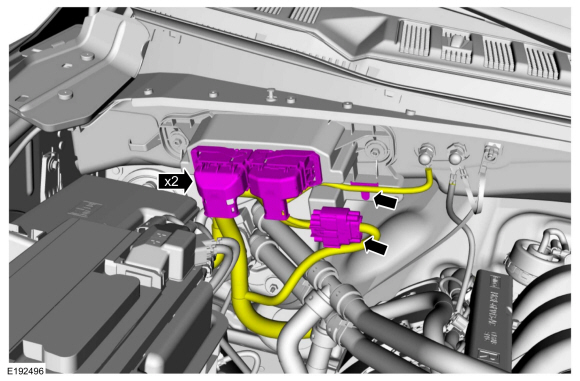
Disconnect the PCM electrical connectors, release the harness retainers to position aside wire harness.
 |
-
-
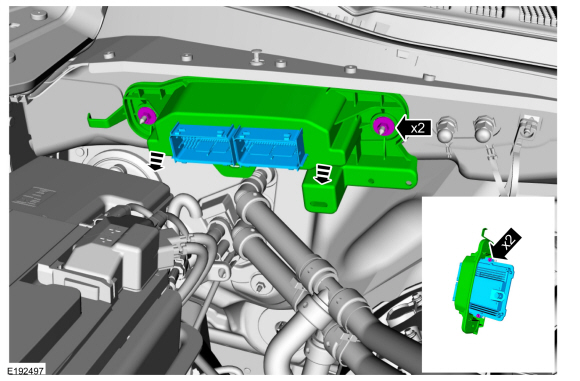
Remove the 2 retainers and the PCM .
Torque: 80 lb.in (9 Nm)
-
Remove the retainers and remove the PCM from the mounting frame.
Torque: 62 lb.in (7 Nm)
-
Remove the 2 retainers and the PCM .
 |
Installation
-
To install, reverse the removal procedure.
-
NOTE: This step is only necessary when installing a new component.
Upload the module information from the diagnostic tool using the Programmable Modules Installation routine.
Refer to: Module Programming (418-01A Module Configuration, General Procedures).
-
NOTE: This step is only necessary when installing a new component.
Carry out the Parameter Reset procedure.
Refer to: Anti-Theft Key Programming - Scan Tool (419-01B Passive Anti-Theft System (PATS), General Procedures).
-
NOTE: This step is only necessary when installing a new component.
Using the scan tool, perform the Misfire Monitor Neutral Profile Correction procedure, following the on-screen instructions.
 Oil Pressure Control Solenoid. Removal and Installation
Removal
NOTE:
Removal steps in this procedure may contain installation details.
Remove the engine front cover.
Refer to: Engine Front Cover (303-01 Engine - 3...
 Turbocharger Boost Pressure (TCBP) and Charger Air Cooler Temperature (CACT) Sensor. Removal and Installation
Removal
NOTE:
Removal steps in this procedure may contain installation details.
NOTE:
Lubricate the O ring with clean engine oil...
Other information:
Lincoln Navigator 2018-2026 Workshop Manual: Charge Air Cooler (CAC) Outlet Pipe. Removal and Installation
Removal NOTICE: The turbocharger compressor vanes can be damaged by even the smallest particles. When removing any turbocharger or engine air intake system component, ensure that no debris enters the system. Failure to do so may result in damage to the turbocharger...
Lincoln Navigator 2018-2026 Workshop Manual: Battery Tray. Removal and Installation
Removal NOTE: Removal steps in this procedure may contain installation details. Remove the battery. Refer to: Battery (414-01 Battery, Mounting and Cables, Removal and Installation). Detach the battery cable retainers from the battery tray...
Categories
- Manuals Home
- 4th Gen Lincoln Navigator Service Manual (2018 - 2026)
- Identification Codes. Description and Operation
- Telematics Control Unit (TCU) Module. Removal and Installation
- Neutral Flat Tow Activation and Deactivation. General Procedures
- All Terrain Control Module (ATCM). Removal and Installation
- Vehicle Dynamics Control Module (VDM). Removal and Installation
Axle Tube Bearing. Removal and Installation
Special Tool(s) / General Equipment
 205-123
(T78P-1177-A)
205-123
(T78P-1177-A)
Installer, Axle Shaft Oil Seal
 308-047
(T77F-1102-A)
308-047
(T77F-1102-A)
Remover, Bearing Cup Slide Hammer
