
Lincoln Navigator: Instrument Panel and Console / Overhead Console. Removal and Installation
Removal
-
Release the clips and remove the overhead console.
-
Disconnect the electrical connectors.
-
Disconnect the electrical connectors.
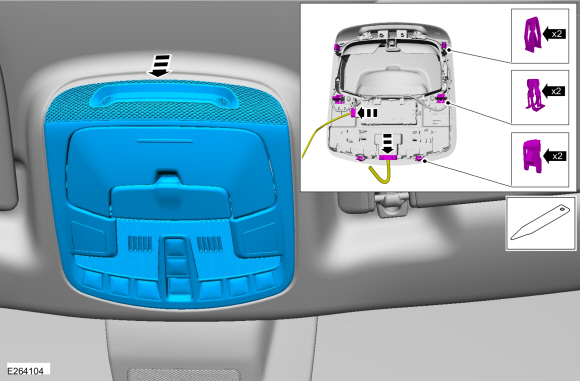 |
Installation
-
To install, reverse the removal procedure.
-
NOTE: This step is only necessary when installing a new overhead console assembly.
Using a diagnostic scan tool, carry out the LIN New Module Initialization procedure (Toolbox>BCM (body control module)LIN New Module Initialization).
-
NOTE: This step is only necessary when installing a new overhead console assembly.
Carry out the BCM self-test. Clear the DTC and then retrieve the DTC from the BCM to confirm all DTC have been cleared.
 Instrument Panel Upper Section. Removal and Installation
Special Tool(s) /
General Equipment
Interior Trim Remover
Removal
NOTE:
Removal steps in this procedure may contain installation details...

Other information:
Lincoln Navigator 2018-2026 Workshop Manual: Front Impact Severity Sensor. Removal and Installation
Removal WARNING: The following procedure prescribes critical repair steps required for correct restraint system operation during a crash. Follow all notes and steps carefully. Failure to follow step instructions may result in incorrect operation of the restraint system and increases the risk of serious personal injury or death in a crash. NOTE: Removal steps in this..
Lincoln Navigator 2018-2026 Workshop Manual: Rear Temperature Sensor. Removal and Installation
Removal NOTE: Removal steps in this procedure may contain installation details. Lower the headliner. Refer to: Headliner - Lowering (501-05 Interior Trim and Ornamentation, Removal and Installation). Disconnect the rear temperature sensor electrical connector. Release the tabs. Remove the rear temperature s..
Categories
- Manuals Home
- 4th Gen Lincoln Navigator Service Manual (2018 - 2026)
- Liftgate Trim Panel. Removal and Installation
- Transmission Fluid Level Check. General Procedures
- Body and Paint
- Neutral Flat Tow Activation and Deactivation. General Procedures
- Rear View Mirrors - System Operation and Component Description. Description and Operation
Wheel to Hub Runout Minimization. General Procedures
Check
NOTE: Wheel-to-hub optimization is important. Clearance between the wheel and hub can be used to offset or neutralize the Road Force® or run-out of the wheel and tire assembly. For every 0.001 inch of wheel-to-hub clearance, the Road Force® can be affected between 1 and 3 pounds depending on the tire stiffness.
NOTE: The example below illustrates how the clearance between the wheel and the hub can be used to offset the high spot of radial run-out or Road Force®. Following the procedure will make sure of the best optimization.
Position the wheel and tire assembly on the vehicle so that the high spot location of radial run-out or Road Force® is at the 6 o'clock position and