Lincoln Navigator: Collision Warning and Collision Avoidance System / Collision Warning and Collision Avoidance System. Diagnosis and Testing
DTC Charts
Diagnostics in this manual assume a certain skill level and knowledge of Ford-specific diagnostic practices.
REFER to: Diagnostic Methods (100-00 General Information, Description and Operation).
DTC Chart: Head Up Display (HUD) Module
DTC Charts: HUD Module
| DTC | Description | Actions |
|---|---|---|
| All HUD module Diagnostic Trouble Codes (DTCs) | Refer to the pinpoint test. |
REFER to: Instrumentation, Message Center and Warning Chimes - Vehicles With: Head Up Display (HUD) (413-01 Instrumentation, Message Center and Warning Chimes, Diagnosis and Testing). |
Symptom Chart
Diagnostics in this manual assume a certain skill level and knowledge of Ford-specific diagnostic practices.
REFER to: Diagnostic Methods (100-00 General Information, Description and Operation).
Symptom Chart
| Condition | Possible Sources | Actions |
|---|---|---|
| HUD module does not respond to the diagnostic scan tool | Refer to the pinpoint test. |
REFER to: Controller Area Network (CAN) Module Communications Network - System Operation and Component Description (418-00A Controller Area Network (CAN) Module Communications Network, Description and Operation). |
| The HUD module is inoperative | Refer to the pinpoint test. |
REFER to: Instrumentation, Message Center and Warning Chimes - Vehicles With: Head Up Display (HUD) (413-01 Instrumentation, Message Center and Warning Chimes, Diagnosis and Testing). |
| The HUD does not display clearly, is distorted or cut off on the windshield | Refer to the pinpoint test. |
REFER to: Instrumentation, Message Center and Warning Chimes - Vehicles With: Head Up Display (HUD) (413-01 Instrumentation, Message Center and Warning Chimes, Diagnosis and Testing). |
| All other HUD module symptoms | Refer to the pinpoint test. |
REFER to: Instrumentation, Message Center and Warning Chimes - Vehicles With: Head Up Display (HUD) (413-01 Instrumentation, Message Center and Warning Chimes, Diagnosis and Testing). |

 Head Up Display (HUD) Module Calibration. General Procedures
Special Tool(s) /
General Equipment
501-418Calibration Target - NO STEP File Available
501-419Hud Eye Box
Adjustment
NOTE:
If it is necessary to cancel any calibration adjustment use the return button to cancel the current adjustment...
Other information:
Lincoln Navigator 2018-2026 Workshop Manual: Audio Front Control Module (ACM). Removal and Installation
Special Tool(s) / General Equipment Interior Trim Remover Removal NOTE: Removal steps in this procedure may contain installation details. NOTE: If installing a new module, it is necessary to upload the module configuration information to the scan tool prior to removing the module...
Lincoln Navigator 2018-2026 Workshop Manual: Body Control Module (BCM). Diagnosis and Testing
Diagnostic Trouble Code (DTC) Chart Diagnostics in this manual assume a certain skill level and knowledge of Ford-specific diagnostic practices. REFER to: Diagnostic Methods (100-00 General Information, Description and Operation). Module DTC Description Action BCM B11D8:01 Restraint Event Notification: General Electrical Failure GO to Pinpoint Test A BCM ..
Categories
- Manuals Home
- 4th Gen Lincoln Navigator Service Manual (2018 - 2026)
- Body Control Module (BCM). Removal and Installation
- Transmission Fluid Drain and Refill. General Procedures
- Neutral Flat Tow Activation and Deactivation. General Procedures
- Liftgate Trim Panel. Removal and Installation
- SYNC Module [APIM]. Removal and Installation
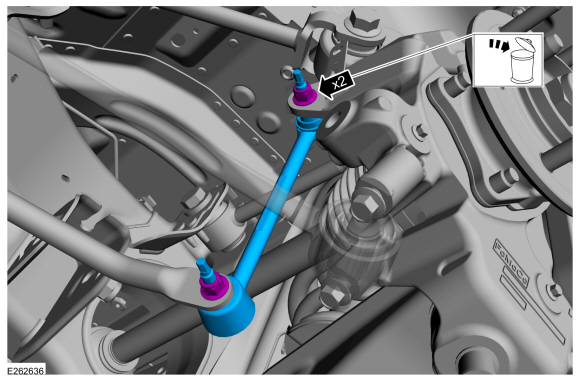
Rear Stabilizer Bar Link. Removal and Installation
Removal
NOTE: Removal steps in this procedure may contain installation details.
With the vehicle in NEUTRAL, position it on a hoist.Refer to: Jacking and Lifting (100-02 Jacking and Lifting, Description and Operation).
NOTE: Use the hex-holding feature to prevent the stud from turning while removing the nut.
Remove and discard the 2 rear stabilizer bar link nuts and remove the rear stabilizer bar link.Torque: 46 lb.ft (63 Nm)