
Lincoln Navigator: Wipers and Washers / Washer Hose Coupling. General Procedures
Disconnect
-
Refer to: Health and Safety Precautions (100-00 General Information, Description and Operation). WARNING:
Before beginning any service procedure in this
section, refer to Safety Warnings in section 100-00 General Information.
Failure to follow this instruction may result in serious personal
injury.
WARNING:
Before beginning any service procedure in this
section, refer to Safety Warnings in section 100-00 General Information.
Failure to follow this instruction may result in serious personal
injury.
-
NOTICE: To prevent damage to the coupler, do not use hand tools to disconnect /connect the C-lock.
NOTE: Do not remove the lock ring from the C-lock coupler.
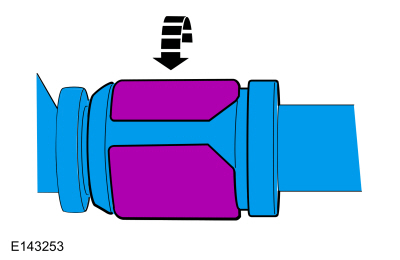
NOTE: Hold the female side of the coupler at the hose connection to prevent the coupler from rotating internally.
Gently twist the lock ring until it has rotated approximately 90 degrees.
 |
-
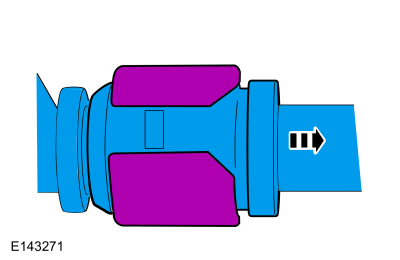
NOTICE: The female side of the C-lock coupler contains an o-ring seal. Use care not to lose the o-ring.
Slide the C-lock coupler apart from the component fitting.
 |
-
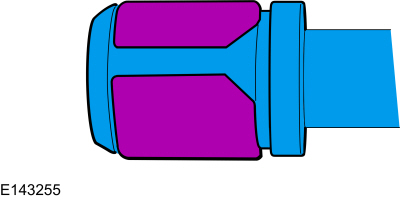
NOTICE: Do not leave the lock ring in the unlocked position. This will weaken the lock ring and prevent it from correctly locking in place when reassembled, resulting in a leak.
Rotate the lock ring back to the original locked position.
 |
-
To connect, verify the C-lock coupler lock ring is in the locked position.
-
NOTE: The lock ring flexes open slightly to allow the male fitting to enter the C-lock coupler.
NOTE: The lock ring can be heard as it snaps into the lock position.
Insert the male fitting into the C-lock coupler.
-
Gently pull on the C-lock coupler to verify it is seated correctly.
 Wipers and Washers. Diagnosis and Testing
Diagnostic Trouble Code (DTC) Chart
Diagnostics in this manual assume a certain skill level and knowledge of Ford-specific diagnostic practices. REFER to: Diagnostic Methods (100-00 General Information, Description and Operation)...
 Washer Hose Repair. General Procedures
Repair
NOTE:
This procedure may be carried out on rubber hoses only. If a
plastic washer hose is damaged, a new washer hose must be installed.
Locate and verify the damaged washer hose...
Other information:
Lincoln Navigator 2018-2026 Workshop Manual: Gear Shift Module (GSM). Removal and Installation
Removal NOTE: Removal steps in this procedure may contain installation details. Detach and position aside the ambient light bar and disconnect the wiring harness retainer. Remove the screws, disconnect the electrical connector and remove the GSM ...
Lincoln Navigator 2018-2026 Workshop Manual: Engine Rear Undershield. Removal and Installation
NOTICE: Support the engine rear undershield while the fasteners are being removed and installed. Do not support the engine rear undershield by any less than the total number of fasteners at any time. Holding the shield in its correct position, remove the fasteners and the engine rear undershield...
Categories
- Manuals Home
- 4th Gen Lincoln Navigator Service Manual (2018 - 2026)
- Windshield Washer Pump. Removal and Installation
- Transmission Fluid Drain and Refill. General Procedures
- Rear View Mirrors - System Operation and Component Description. Description and Operation
- Remote Function Actuator (RFA) Module. Removal and Installation
- Brake Service Mode Activation and Deactivation. General Procedures
Diagnostic Methods. Description and Operation
This document provides critical diagnostic knowledge required for successful repair outcomes. It identifies technical competencies expected by users of this manual.
Ford Diagnostic Assumptions
Ford diagnostics assume the vehicle concern described by the test title is currently present. Exceptions to this rule are noted in each test. Do not replace modules or other components as directed by a diagnostic if the concern is not present at the time of testing.
