Lincoln Navigator: Information and Entertainment System - General Information - Vehicles With: SYNC 4 / Speaker Audio Test. General Procedures
Activation
NOTE: The procedure used to download the audio files varies, depending on the web browser used.
-
Using a suitable web browser, download all of the diagnostic sound tracks to a suitable USB drive.
- 125Hz Sample
- 100Hz Sample
- 80Hz Sample
- 63Hz Sample
- 50Hz Sample
- 40Hz Sample
 Bezel Diagnostics. General Procedures
Check
NOTE:
If there is a concern with one of the following components
and Bezel Diagnostics cannot be accessed, obtain the module part number
by referencing the label attached to the module...
 AM/FM1 Antenna Amplifier. Removal and Installation
Removal
NOTE:
Removal steps in this procedure may contain installation details.
Remove the upper RH C-pillar trim panel.
Refer to: C-Pillar Trim Panel (501-05 Interior Trim and Ornamentation, Removal and Installation)...
Other information:
Lincoln Navigator 2018-2026 Workshop Manual: Handles, Locks, Latches and Entry Systems - System Operation and Component Description. Description and Operation
System Operation System Diagram Item Description 1 BCM 2 DDM 3 GWM 4 DLC 5 IPC 6 PDM 7 Passenger Door Lock Control Switch 8 Passive Key 9 RKE And Passive Entry Commands 10 Lock/Unlock/ Inputs 11 Antenna Activatio..
Lincoln Navigator 2018-2026 Workshop Manual: Side Curtain Airbag. Removal and Installation
Removal WARNING: The following procedure prescribes critical repair steps required for correct restraint system operation during a crash. Follow all notes and steps carefully. Failure to follow step instructions may result in incorrect operation of the restraint system and increases the risk of serious personal injury or death in a crash. NOTE: Removal steps in this..
Categories
- Manuals Home
- 4th Gen Lincoln Navigator Service Manual (2018 - 2026)
- Rear View Mirrors - System Operation and Component Description. Description and Operation
- Power Running Board (PRB). Diagnosis and Testing
- Transmission Fluid Drain and Refill. General Procedures
- SYNC Module [APIM]. Removal and Installation
- Body and Paint
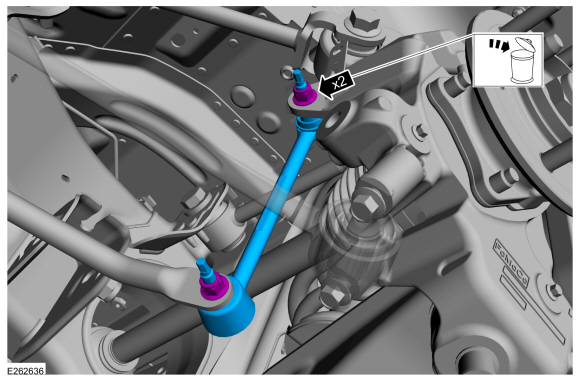
Rear Stabilizer Bar Link. Removal and Installation
Removal
NOTE: Removal steps in this procedure may contain installation details.
With the vehicle in NEUTRAL, position it on a hoist.Refer to: Jacking and Lifting (100-02 Jacking and Lifting, Description and Operation).
NOTE: Use the hex-holding feature to prevent the stud from turning while removing the nut.
Remove and discard the 2 rear stabilizer bar link nuts and remove the rear stabilizer bar link.Torque: 46 lb.ft (63 Nm)