
Lincoln Navigator: Parking Aid - Vehicles With: Active Park Assist / Front Active Park Assist Sensors. Removal and Installation
Removal
NOTE: Removal steps in this procedure may contain installation details.
NOTE: LH side shown, RH side similar.
-
Remove the front wheel and tire assembly.
Refer to: Wheel and Tire (204-04A Wheels and Tires, Removal and Installation).
-
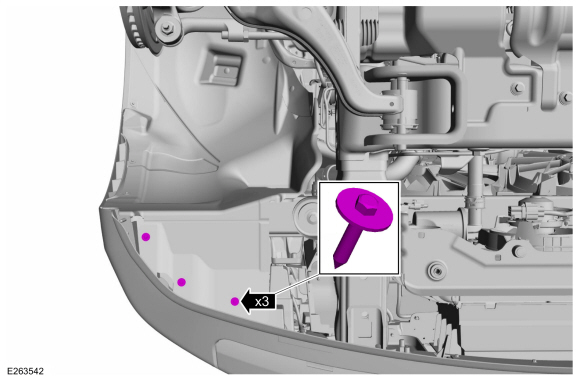
Remove the front fender liner screws.
Torque: 15 lb.in (1.7 Nm)
 |
-
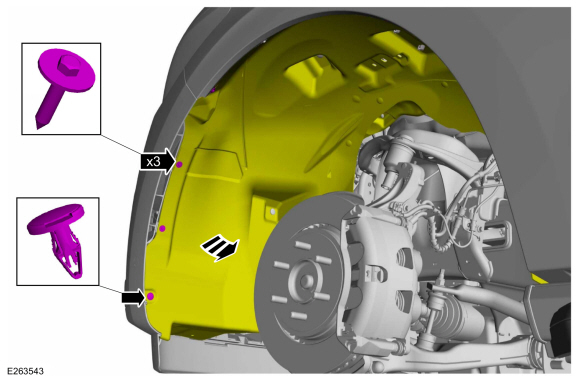
Remove the pin-type retainer, the screws and position the fender liner aside.
Torque: 15 lb.in (1.7 Nm)
 |
-
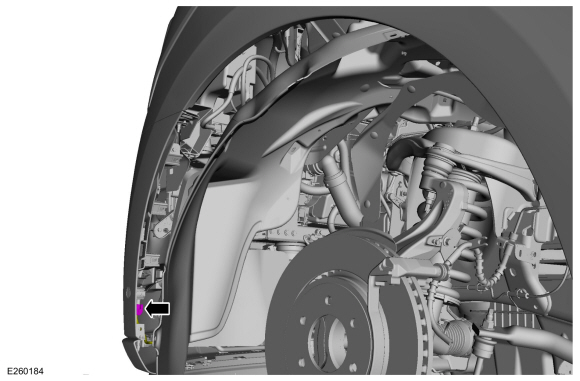
Disconnect the front active park assist sensor electrical connector.
 |
-
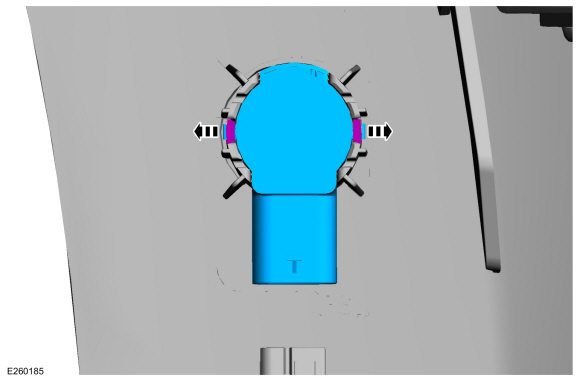
Release the tabs and remove the front active park assist sensor.
 |
Installation
NOTE: Make sure that the isolator rings are installed correctly while installing the sensors.
-
To install, reverse the removal procedure.
-
Carry out the azimuth elevation check.
Refer to: Azimuth System Check (413-13C Parking Aid - Vehicles With: Active Park Assist, General Procedures).
-
If any sensor fails the checks, diagnose the sensor fault.
Refer to: Parking Aid - System Operation and Component Description (413-13C Parking Aid - Vehicles With: Active Park Assist, Description and Operation).
 Azimuth System Check. General Procedures
Check
NOTE:
Car shown, trucks are similar.
Turn the ignition ON, engine OFF.
Set the parking brake on...
 Rear Active Park Assist Sensors. Removal and Installation
Removal
NOTE:
Removal steps in this procedure may contain installation details.
NOTE:
RH side shown, LH side similar.
Position the vehicle on a hoist...
Other information:
Lincoln Navigator 2018-2026 Workshop Manual: Supplemental Restraint System (SRS) Repowering. General Procedures
Repower WARNING: Incorrect repair techniques or actions can cause an accidental Supplemental Restraint System (SRS) deployment. Never compromise or depart from these instructions. Failure to precisely follow all instructions could result in serious personal injury from an accidental deployment...
Lincoln Navigator 2018-2026 Workshop Manual: Power Running Board (PRB). Diagnosis and Testing
DTC Chart: Running Board Control Module (RBM) Diagnostics in this manual assume a certain skill level and knowledge of Ford-specific diagnostic practices. REFER to: Diagnostic Methods (100-00 General Information, Description and Operation). RBM DTC Chart DTC Description Action C1002:77 Le..
Categories
- Manuals Home
- 4th Gen Lincoln Navigator Service Manual (2018 - 2026)
- SYNC Module [APIM]. Removal and Installation
- Body and Paint
- Transmission Fluid Level Check. General Procedures
- Neutral Flat Tow Activation and Deactivation. General Procedures
- Rear View Mirrors - System Operation and Component Description. Description and Operation
Front Stabilizer Bar Link. Removal and Installation
Removal
NOTICE: Suspension fasteners are critical parts that affect the performance of vital components and systems. Failure of these fasteners may result in major service expense. Use the same or equivalent parts if replacement is necessary. Do not use a replacement part of lesser quality or substitute design. Tighten fasteners as specified.
NOTE: Removal steps in this procedure may contain installation details.
With the vehicle in NEUTRAL, position it on a hoist.Refer to: Jacking and Lifting (100-02 Jacking and Lifting, Description and Operation).
NOTICE: Do not use power tools to remove or install the stabilizer bar
