
Lincoln Navigator: Engine Emission Control - 3.5L EcoBoost (272kW/370PS) / Crankcase Ventilation Tube. Removal and Installation
Special Tool(s) / General Equipment
| Knife |
Removal
NOTICE: The turbocharger compressor vanes can be damaged by even the smallest particles. When removing any turbocharger or engine air intake system component, ensure that no debris enters the system. Failure to do so may result in damage to the turbocharger.
NOTE: Removal steps in this procedure may contain installation details.
-
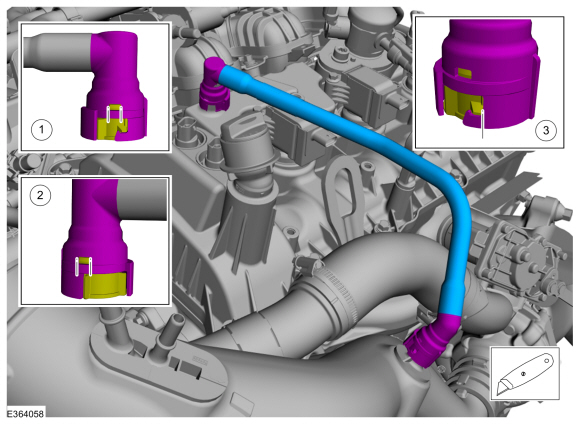
Cut housing lock tabs and remove the crankcase ventilation tube.
Use the General Equipment: Knife
 |
Installation
-
Inspect the turbocharger or engine air intake system components and clean, if necessary.
 Exhaust Gas Recirculation (EGR) System. Diagnosis and Testing
Diagnostic Trouble Code (DTC) Chart
Diagnostics in this manual assume a certain skill level and knowledge of Ford-specific diagnostic practices. REFER to: Diagnostic Methods (100-00 General Information, Description and Operation)...
 Differential Pressure Feedback Exhaust Gas Recirculation (EGR) Sensor. Removal and Installation
Removal
NOTE:
Removal steps in this procedure may contain installation details.
Remove the engine appearance cover retainers, release
the engine appearance cover from the rear retainers and then remove the
engine appearance cover...
Other information:
Lincoln Navigator 2018-2026 Workshop Manual: Engine Cooling. Diagnosis and Testing
Special Tool(s) Coolant/Battery RefractometerROB75240 or equivalent D-Gas Adapter300-OTC014-R1068 or equivalent Radiator Tester014-R1072 or equivalent UView® Combustion Leak TesterUVU560000-R Diagnostic Trouble Code (DTC) Chart Diagnostics in this manual assume a certain skill level and knowl..
Lincoln Navigator 2018-2026 Workshop Manual: Air Conditioning (A/C) Compressor Leak Detection. General Procedures
Leak detection Recover the refrigerant. Refer to Air Conditioning (A/C) System Recovery, Evacuation and Charging procedure in Group 412. Disconnect the refrigerant lines from the A/C compressor. Refer to the appropriate section in Group 412 for the procedure. Install the adapters from the A/C Flush Adapter Kit on the ports of the A/C compressor, u..
Categories
- Manuals Home
- 4th Gen Lincoln Navigator Service Manual (2018 - 2026)
- Vehicle Dynamics Control Module (VDM). Removal and Installation
- Neutral Flat Tow Activation and Deactivation. General Procedures
- Windshield Washer Pump. Removal and Installation
- Front Seat. Removal and Installation
- SYNC Module [APIM]. Removal and Installation
Wheel to Hub Runout Minimization. General Procedures
Check
NOTE: Wheel-to-hub optimization is important. Clearance between the wheel and hub can be used to offset or neutralize the Road Force® or run-out of the wheel and tire assembly. For every 0.001 inch of wheel-to-hub clearance, the Road Force® can be affected between 1 and 3 pounds depending on the tire stiffness.
NOTE: The example below illustrates how the clearance between the wheel and the hub can be used to offset the high spot of radial run-out or Road Force®. Following the procedure will make sure of the best optimization.
Position the wheel and tire assembly on the vehicle so that the high spot location of radial run-out or Road Force® is at the 6 o'clock position and