
Lincoln Navigator: Climate Control System - General Information / Center Registers. Removal and Installation
Special Tool(s) / General Equipment
| Interior Trim Remover |
Removal
NOTE: Removal steps in this procedure may contain installation details.
-
Release the clips and remove the FDIM bracket cover.
Use the General Equipment: Interior Trim Remover
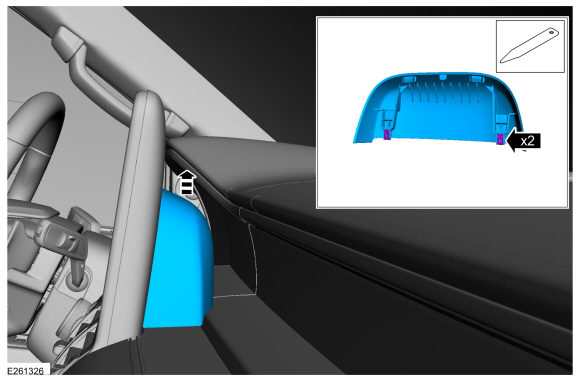 |
-
Remove the bolt and disconnect the LVDS connector.
Torque: 80 lb.in (9 Nm)
 |
-
Remove the center register trim panel.
Use the General Equipment: Interior Trim Remover
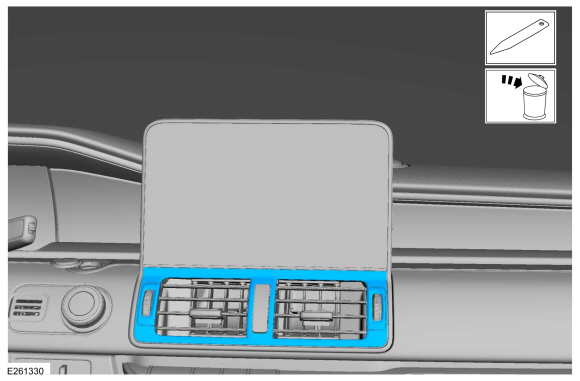 |
-
Remove the bolts and position the FDIM and center register forward as an assembly.
Torque: 22 lb.in (2.5 Nm)
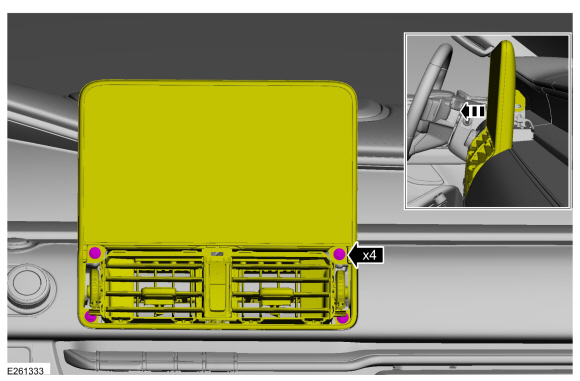 |
-
On both top and bottom of the center register.
Release the clips and position the FDIM off the center register.
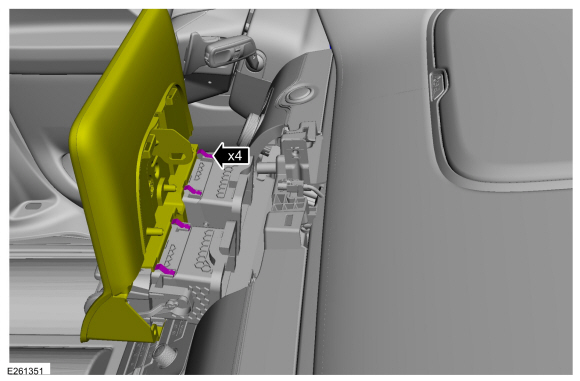 |
-
Disconnect the electrical connector and remove the center register.
 |
Installation
-
To install, reverse the removal procedure.
 Cabin Heater Coolant Pump. Removal and Installation
Special Tool(s) /
General Equipment
Hose Clamp Remover/Installer
Fluid Container
Locking Pliers
Removal
NOTE:
Removal steps in this procedure may contain installation details...
 Climate Control Housing. Removal and Installation
Removal
NOTICE:
During the removal or installation of components, cap, tape
or otherwise appropriately protect all openings and tubes/fittings to
prevent the ingress of dirt or other contamination...
Other information:
Lincoln Navigator 2018-2026 Workshop Manual: Wastegate Control Actuator RH. Removal and Installation
Removal NOTICE: The turbocharger compressor vanes can be damaged by even the smallest particles. When removing any turbocharger or engine air intake system component, ensure that no debris enters the system. Failure to do so may result in damage to the turbocharger...
Lincoln Navigator 2018-2026 Workshop Manual: Four-Wheel Drive Systems - Overview. Description and Operation
Torque-On-Demand Four Wheel Drive System The torque-on-demand system consists of the following components: ATCM TCCM 4WD mode indicators and messages in the IPC message center Transfer case with high capacity clutch The transfer case is equipped with an electronically controlled high capacity clutch which is l..
Categories
- Manuals Home
- 4th Gen Lincoln Navigator Service Manual (2018 - 2026)
- Power Running Board (PRB). Diagnosis and Testing
- Liftgate Trim Panel. Removal and Installation
- SYNC Module [APIM]. Removal and Installation
- Rear Bumper. Removal and Installation
- Front Seat. Removal and Installation
Differential Case Runout Check. General Procedures
Special Tool(s) / General Equipment
 205-1016
Installer, Differential Bearing
TKIT-2014D-ROW2
TKIT-2014D-FL_ROW
 205-153
(T80T-4000-W)
205-153
(T80T-4000-W)
Handle
 205-D061
(D83T-4205-C2)
205-D061
(D83T-4205-C2)
Step Plate Dial Indicator Three Leg Puller Punch
