
Lincoln Navigator: Multifunction Electronic Modules / Body Control Module C (BCMC). Removal and Installation
Removal
NOTE: Removal steps in this procedure may contain installation details.
-
NOTE: If the BCMC (body control module C) did not respond to the diagnostic scan tool, As-Built Data may need to be entered as part of the repair. This step is only necessary if the BCMC (body control module C) is being replaced.
Using a diagnostic scan tool, begin the PMI process for the BCMC following the on-screen instructions.
-
Disconnect the battery.
Refer to: Battery Disconnect and Connect (414-01 Battery, Mounting and Cables, General Procedures).
-
Remove the BCMC side cover.
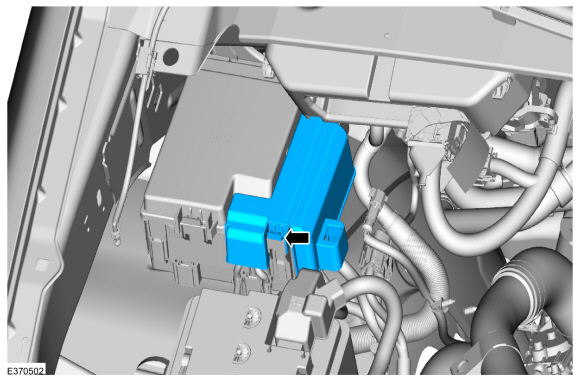 |
-
NOTE: By vehicle trim levels, there may be more or less wiring connectors.
Remove the nuts and the wire connectors.
Torque: 93 lb.in (10.5 Nm)
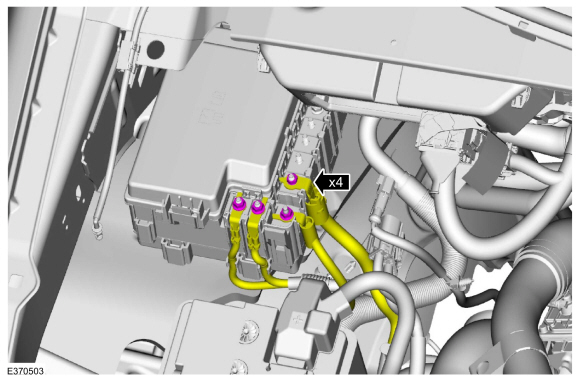 |
-
Remove the BCMC top cover.
 |
-
Fully loosen the BCMC bolts.
 |
-
Release the clips and lift up the BCMC to access the connectors.
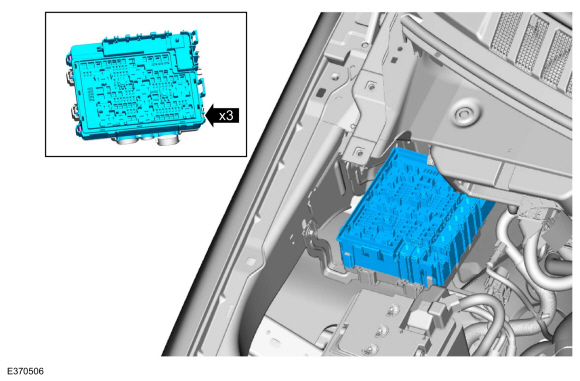 |
-
Disconnect the connectors and remove the BCMC .
 |
Installation
-
To install, reverse the removal procedure.
-
NOTE: Carry out this step only if the BCMC (body control module C) is being replaced.
Using a diagnostic scan tool, complete the PMI process for the BCMC following the on-screen instructions.
 Body Control Module (BCM). Removal and Installation
Removal
NOTE:
Removal steps in this procedure may contain installation details.
If installing a new BCM , connect a battery charger to the battery to
make sure it is charged to maintain proper battery voltage...
 Driver Door Module (DDM). Removal and Installation
Removal
NOTE:
Removal steps in this procedure may contain installation details.
NOTE:
If installing a new module, it is necessary to
upload the module configuration information to the diagnostic scan tool
prior to removing the module...
Other information:
Lincoln Navigator 2018-2026 Workshop Manual: Transmission Fluid Auxiliary Pump. Description and Operation
Item Description 1 Transmission fluid auxiliary pump 2 Transmission fluid auxiliary pump tube 3 Transmission fluid auxiliary pump tube seal 4 Transmission fluid auxiliary pump tube O-ring 5 Transmission fluid auxiliary pump fluid inl..
Lincoln Navigator 2018-2026 Workshop Manual: Rear Halfshaft Seal. Removal and Installation
Special Tool(s) / General Equipment 205-907Handle, 32 DriverTKIT-2008DH-FLM 206-034 (T88P-20202-B) Installer, Wheel Speed Sensor RingTKIT-1988-FLMTKIT-1988-LM Feeler Gauge Removal NOTE: Removal steps in this procedure may contain installation details. NOTE: The stub shaft seals must be replaced whenever the halfshafts are removed. ..
Categories
- Manuals Home
- 4th Gen Lincoln Navigator Service Manual (2018 - 2026)
- Rear Bumper. Removal and Installation
- Brake Service Mode Activation and Deactivation. General Procedures
- Vehicle Dynamics Control Module (VDM). Removal and Installation
- Transmission Fluid Level Check. General Procedures
- SYNC Module [APIM]. Removal and Installation
Front Driveshaft. Removal and Installation
Special Tool(s) / General Equipment
Crimping ToolMaterials
Name Specification Motorcraft® Premium Long-Life GreaseXG-1-E1 ESA-M1C75-B
Removal
With the vehicle in NEUTRAL, position the vehicle on a hoist.Refer to: Jacking and Lifting (100-02 Jacking and Lifting, Description and Operation).
Remove the bolts and the transmission shield.
