
Lincoln Navigator: Lane Keeping System / Image Processing Module A (IPMA) Camera. Removal and Installation
Removal
NOTE: Removal steps in this procedure may contain installation details.
-
Remove the rain sensor cover.
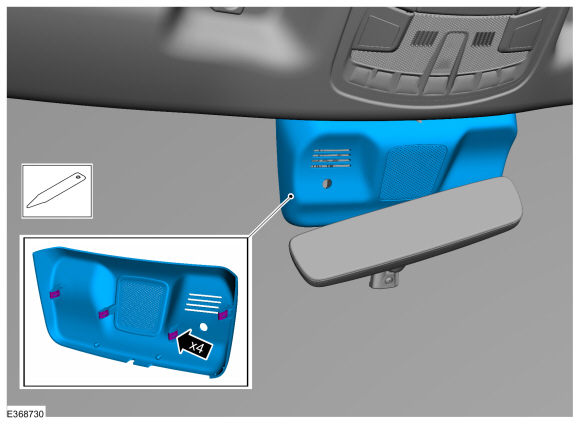 |
-
Disconnect the IPMA camera electrical connector.
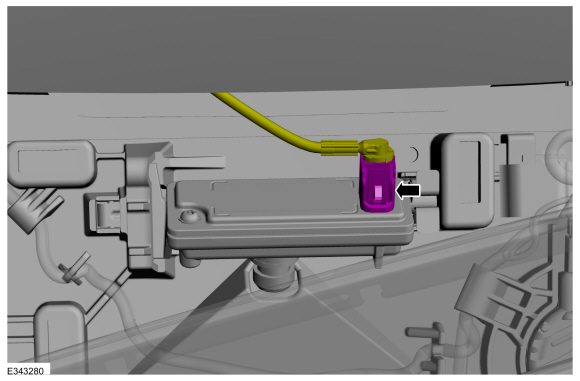 |
-
-
Release the tab.
-
Release the tab and remove the IPMA camera.
-
Release the tab.
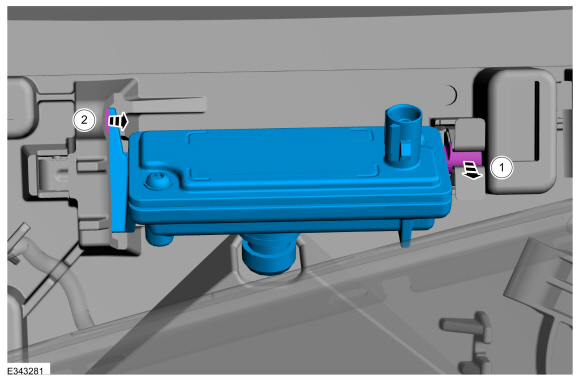 |
Installation
-
To install, reverse the removal procedure.
-
If a new IPMA camera has been installed, carry out the camera alignment using a scan tool.
 Image Processing Module A (IPMA). Removal and Installation
Removal
If a new IPMA is being installed, using a diagnostic scan tool, begin
the PMI process for the IPMA following the on-screen instructions...

Other information:
Lincoln Navigator 2018-2026 Workshop Manual: Perimeter Anti-Theft Alarm - System Operation and Component Description. Description and Operation
System Operation System Diagram Item Description 1 BCM 2 DDM 3 DRDM 4 GWM 5 DLC 6 IPC 7 PDM 8 PRDM 9 Front Passenger Door Lock Control Switch 10 RKE Antenna 11 Passive Key 12 RKE And Passive E..
Lincoln Navigator 2018-2026 Workshop Manual: Transmission Support Insulator. Removal and Installation
Removal With the vehicle in NEUTRAL, position it on a hoist. Refer to: Jacking and Lifting (100-02 Jacking and Lifting, Description and Operation). Remove the transmission support crossmember. Refer to: Transmission Support Crossmember (502-02 Full Frame and Body Mounting, Removal and Installation). Rear Wheel Drive (RWD) vehicles ..
Categories
- Manuals Home
- 4th Gen Lincoln Navigator Service Manual (2018 - 2026)
- Rear View Mirrors - System Operation and Component Description. Description and Operation
- Liftgate Trim Panel. Removal and Installation
- Telematics Control Unit (TCU) Module. Removal and Installation
- Body Control Module (BCM). Removal and Installation
- Power Running Board (PRB). Diagnosis and Testing
Front Driveshaft. Removal and Installation
Special Tool(s) / General Equipment
Crimping ToolMaterials
Name Specification Motorcraft® Premium Long-Life GreaseXG-1-E1 ESA-M1C75-B
Removal
With the vehicle in NEUTRAL, position the vehicle on a hoist.Refer to: Jacking and Lifting (100-02 Jacking and Lifting, Description and Operation).
Remove the bolts and the transmission shield.
