
Lincoln Navigator: Front Disc Brake / Front Brake Flexible Hose. Removal and Installation
Removal
NOTICE: Make sure that all openings are sealed.
NOTICE: If the fluid is spilled on the paintwork, the affected area must be immediately washed down with cold water.
NOTE: Removal steps in this procedure may contain installation details.
All vehicles
-
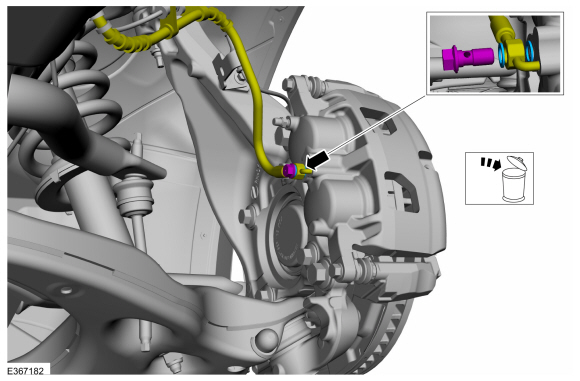
Remove the bolt and disconnect the brake hose. Discard the washers.
Torque: 26 lb.ft (35 Nm)
 |
Rear wheel drive (RWD) vehicles
-
-
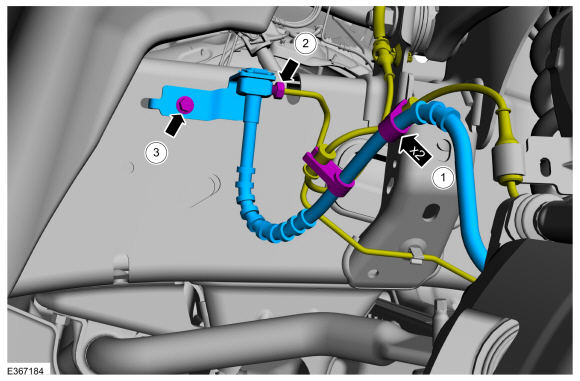
Unclip the ABS harness from the brake hose.
-
Disconnect the brake tube fitting.
Torque: 177 lb.in (20 Nm)
-
Remove the brake hose bracket bolt.
Torque: 177 lb.in (20 Nm)
-
Unclip the ABS harness from the brake hose.
 |
Four wheel drive (4x4) vehicles
-
-
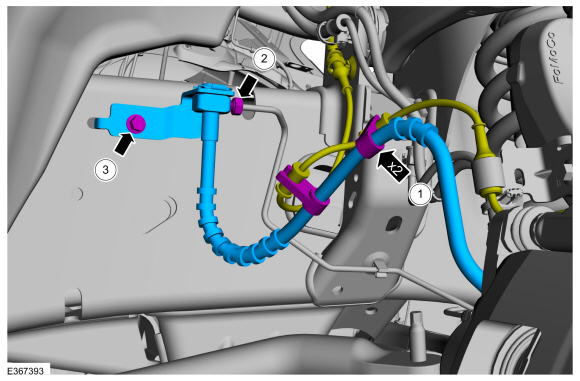
Unclip the ABS harness retainers from brake hose.
-
Disconnect the brake tube fitting.
Torque: 177 lb.in (20 Nm)
-
Remove the brake hose bracket bolt.
Torque: 177 lb.in (20 Nm)
-
Unclip the ABS harness retainers from brake hose.
 |
Installation
-
To install, reverse the removal procedure.
-
Bleed the brake system.
Refer to: Brake System Pressure Bleeding (206-00 Brake System - General Information, General Procedures).
 Brake Pads. Removal and Installation
Removal
NOTE:
Removal steps in this procedure may contain installation details.
NOTE:
2WD shown, 4WD similar.
Remove the wheel and tire...

Other information:
Lincoln Navigator 2018-2026 Workshop Manual: Identification Codes. Description and Operation
VIN VIN Locator The VIN is a 17-digit combination of letters and numbers. The VIN is stamped on a metal tab riveted to the instrument panel, top upper left of the dash. The VIN is also found on the VC label. If the VIN plate requires replacement, authorized dealers must contact their respective regional office. Item Descri..
Lincoln Navigator 2018-2026 Workshop Manual: Steering Column Lower Shaft. Removal and Installation
Removal NOTE: Removal steps in this procedure may contain installation details. NOTE: Do not allow the steering column to rotate while the steering column shaft is disconnected or damage to the steering column internal sensor may result. NOTE: Use a steering wheel holding device (such as Hunter® 28-75-1 or equivalent). Keep the steering wheel in the s..
Categories
- Manuals Home
- 4th Gen Lincoln Navigator Service Manual (2018 - 2026)
- Windshield Washer Pump. Removal and Installation
- Transmission Fluid Drain and Refill. General Procedures
- Vehicle Dynamics Control Module (VDM). Removal and Installation
- Remote Function Actuator (RFA) Module. Removal and Installation
- Body Control Module (BCM). Removal and Installation
Differential Case Runout Check. General Procedures
Special Tool(s) / General Equipment
 205-1016
Installer, Differential Bearing
TKIT-2014D-ROW2
TKIT-2014D-FL_ROW
 205-153
(T80T-4000-W)
205-153
(T80T-4000-W)
Handle
 205-D061
(D83T-4205-C2)
205-D061
(D83T-4205-C2)
Step Plate Dial Indicator Three Leg Puller Punch
